aisha-ai-official/animereal-v2 ❓🔢📝✓ → 🖼️
Performance
23.3sTypical run time
~73sCold start (first call)
1.4KTotal runs
About
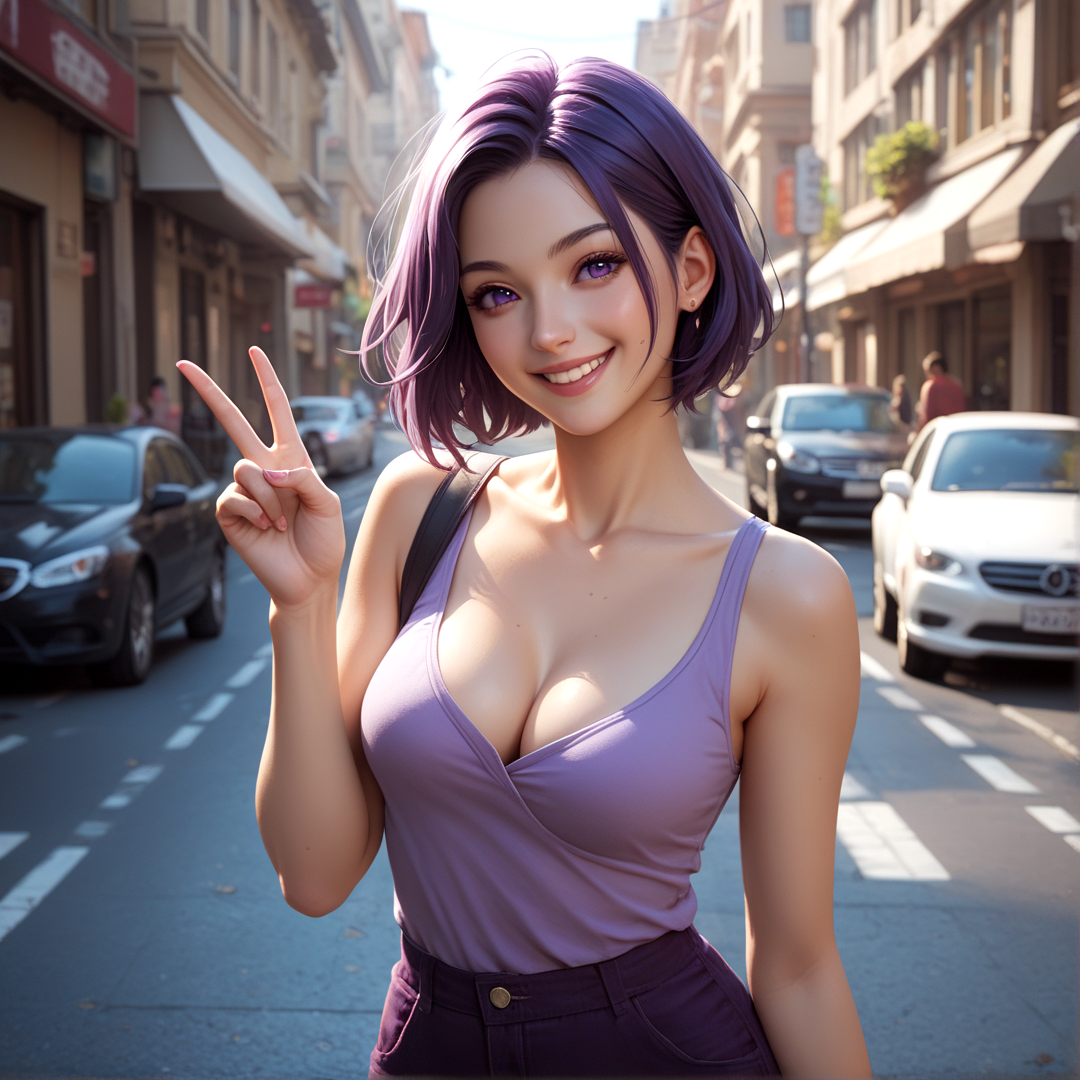
Example Output
Prompt:
"street, 1girl, dark-purple short hair, purple eyes, medium breasts, cleavage, casual clothes, smile, V"
Output
Performance Metrics
23.29s
Prediction Time
72.65s
Total Time
All Input Parameters
{
  "vae": "NeptuniaXL-VAE-ContrastSaturation",
  "seed": -1,
  "model": "AnimeReal-v2",
  "steps": 40,
  "width": 1080,
  "height": 1080,
  "prompt": "street, 1girl, dark-purple short hair, purple eyes, medium breasts, cleavage, casual clothes, smile, V",
  "refiner": false,
  "upscale": "Original",
  "cfg_scale": 5,
  "clip_skip": 2,
  "pag_scale": 0,
  "scheduler": "Euler a",
  "adetailer_face": false,
  "adetailer_hand": false,
  "refiner_prompt": "",
  "negative_prompt": "nsfw, naked",
  "adetailer_person": false,
  "guidance_rescale": 1,
  "refiner_strength": 0.4,
  "prepend_preprompt": true,
  "adetailer_face_prompt": "",
  "adetailer_hand_prompt": "",
  "adetailer_person_prompt": "",
  "adetailer_face_negative_prompt": "",
  "adetailer_hand_negative_prompt": "",
  "adetailer_person_negative_prompt": ""
}
Input Parameters
- vae
- The VAE to use
- seed
- The seed for generation; set to -1 for random seed
- model
- The model to use
- steps
- Number of steps when generating
- width
- The width of the image
- height
- The height of the image
- prompt
- The prompt, uses Compel weighting syntax
- refiner
- Enable image refiner using model
- upscale
- Upscale factor
- cfg_scale
- CFG scale defines how much attention the model pays to the prompt when generating, set to 1 to disable
- clip_skip
- How many CLIP layers to skip; 1 means no skip
- pag_scale
- PAG scale is similar to CFG but improves the result; set to 0 to disable
- scheduler
- The scheduler to use
- adetailer_face
- Use ADetailer face_yolov9c.pt
- adetailer_hand
- Use ADetailer hand_yolov9c.pt
- refiner_prompt
- The prompt of refiner (leave empty for default correct hands and details)
- negative_prompt
- The negative prompt (for things you don't want), uses Compel weighting syntax
- adetailer_person
- Use ADetailer person_yolov8m-seg.pt
- guidance_rescale
- Amount to rescale CFG generated noise to avoid overexposed images, set to 0 or 1 to disable
- refiner_strength
- Refiner strength (0.0 to 1.0)
- prepend_preprompt
- Prepend preprompt (Prompt: "score_9, score_8_up, score_7_up," | Negative prompt: "(ugly:1.35), (worst quality, low quality, normal quality:1.4), watermark, text, signature, logo, artist name, (bad anatomy, malformed hands:1.3), extra fingers, extra limbs, (plastic skin, doll-like:1.2), unrealistic skin texture, lack of skin pores, (blurry, out of focus:1.1), jpeg artifacts, lowres, (flat lighting, overprocessed:1.3), oversaturated, (underexposed, overexposed:1.4), (mobile photo, digital art, CGI, 3D render, cartoon, anime, painting:1.4)")
- adetailer_face_prompt
- ADetailer face prompt (if blank, will use the image prompt)
- adetailer_hand_prompt
- ADetailer hand prompt (if blank, will use: detailed hands, realistic anatomy, well-defined fingers, natural pose, soft shadows, high resolution, intricate details)
- adetailer_person_prompt
- ADetailer person prompt (if blank, will use: best quality, detailed, realistic shadows)
- adetailer_face_negative_prompt
- ADetailer face negative prompt (if blank, will use: blurry, deformed face, extra features, unrealistic skin texture, oversmoothed, low resolution, artifacts)
- adetailer_hand_negative_prompt
- ADetailer hand negative prompt (if blank, will use: extra fingers, fused or missing fingers, blurry, distorted, low detail, poorly drawn, unnatural proportions)
- adetailer_person_negative_prompt
- ADetailer person negative prompt (if blank, will use: deformed, unrealistic proportions, extra limbs, blurred, low quality, distorted pose, exaggerated features)
Output Schema
Output
Example Execution Logs
Using text to image mode.
Using seed: 154007054
  0%|          | 0/40 [00:00<?, ?it/s]
  2%|▎         | 1/40 [00:00<00:23,  1.69it/s]
  5%|▌         | 2/40 [00:00<00:16,  2.37it/s]
  8%|▊         | 3/40 [00:01<00:17,  2.15it/s]
 10%|█         | 4/40 [00:01<00:17,  2.06it/s]
 12%|█▎        | 5/40 [00:02<00:17,  2.01it/s]
 15%|█▌        | 6/40 [00:02<00:17,  1.98it/s]
 18%|█▊        | 7/40 [00:03<00:16,  1.96it/s]
 20%|██        | 8/40 [00:04<00:16,  1.94it/s]
 22%|██▎       | 9/40 [00:04<00:16,  1.93it/s]
 25%|██▌       | 10/40 [00:05<00:15,  1.92it/s]
 28%|██▊       | 11/40 [00:05<00:15,  1.92it/s]
 30%|███       | 12/40 [00:06<00:14,  1.91it/s]
 32%|███▎      | 13/40 [00:06<00:14,  1.92it/s]
 35%|███▌      | 14/40 [00:07<00:13,  1.91it/s]
 38%|███▊      | 15/40 [00:07<00:13,  1.91it/s]
 40%|████      | 16/40 [00:08<00:12,  1.90it/s]
 42%|████▎     | 17/40 [00:08<00:12,  1.90it/s]
 45%|████▌     | 18/40 [00:09<00:11,  1.90it/s]
 48%|████▊     | 19/40 [00:09<00:11,  1.90it/s]
 50%|█████     | 20/40 [00:10<00:10,  1.89it/s]
 52%|█████▎    | 21/40 [00:10<00:10,  1.89it/s]
 55%|█████▌    | 22/40 [00:11<00:09,  1.89it/s]
 57%|█████▊    | 23/40 [00:11<00:08,  1.89it/s]
 60%|██████    | 24/40 [00:12<00:08,  1.89it/s]
 62%|██████▎   | 25/40 [00:12<00:07,  1.89it/s]
 65%|██████▌   | 26/40 [00:13<00:07,  1.89it/s]
 68%|██████▊   | 27/40 [00:14<00:06,  1.88it/s]
 70%|███████   | 28/40 [00:14<00:06,  1.88it/s]
 72%|███████▎  | 29/40 [00:15<00:05,  1.88it/s]
 75%|███████▌  | 30/40 [00:15<00:05,  1.88it/s]
 78%|███████▊  | 31/40 [00:16<00:04,  1.88it/s]
 80%|████████  | 32/40 [00:16<00:04,  1.88it/s]
 82%|████████▎ | 33/40 [00:17<00:03,  1.88it/s]
 85%|████████▌ | 34/40 [00:17<00:03,  1.87it/s]
 88%|████████▊ | 35/40 [00:18<00:02,  1.87it/s]
 90%|█████████ | 36/40 [00:18<00:02,  1.87it/s]
 92%|█████████▎| 37/40 [00:19<00:01,  1.87it/s]
 95%|█████████▌| 38/40 [00:19<00:01,  1.87it/s]
 98%|█████████▊| 39/40 [00:20<00:00,  1.87it/s]
100%|██████████| 40/40 [00:20<00:00,  1.86it/s]
100%|██████████| 40/40 [00:20<00:00,  1.91it/s]
Version Details
- Version ID
bf3269a7737e070843ce629a4f234844e966a2e6bc1f8d34b725851d30c4bfec- Version Created
- March 13, 2025