albertoverdevertical/verde_vertical 🖼️🔢❓📝✓ → 🖼️
Performance
About
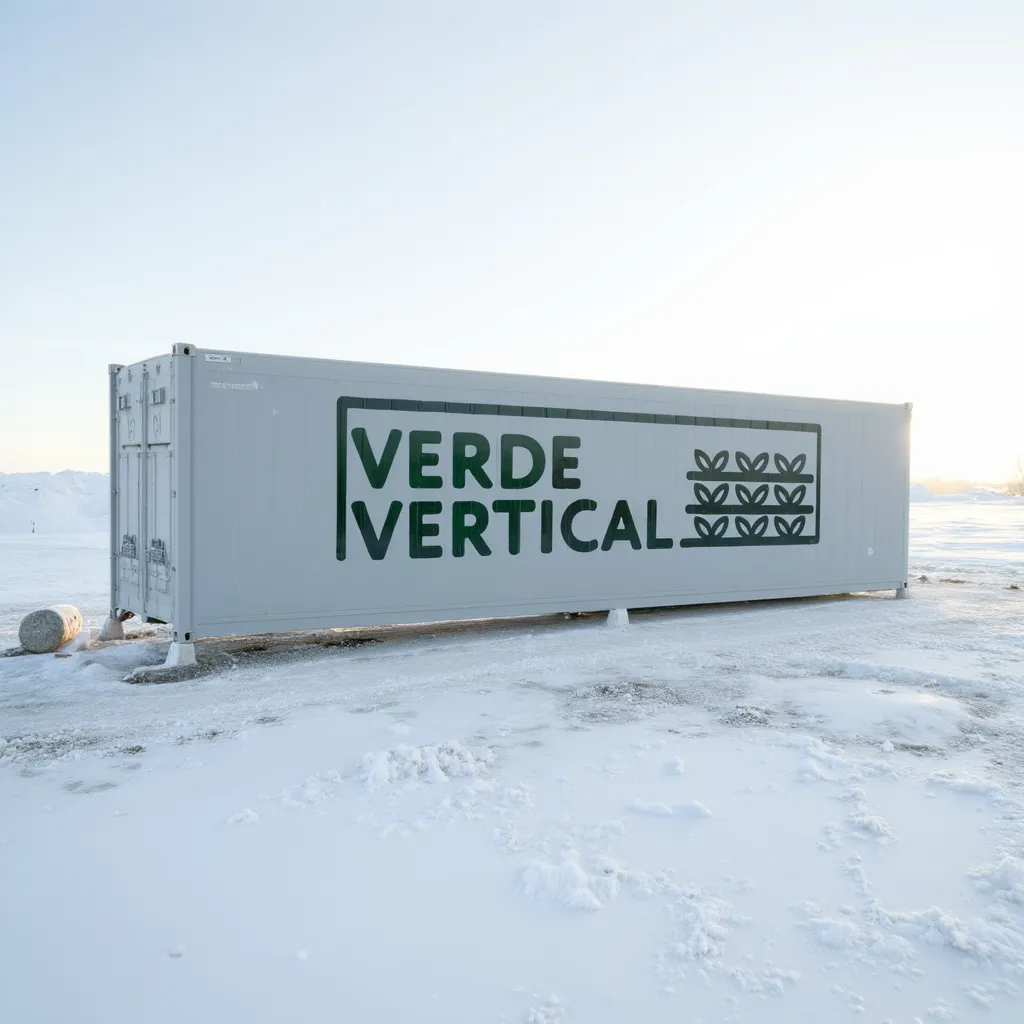
Create images of Verde Vertical shipping containers in remote areas.
Example Output
"
This is a striking image of a solitary CNTNREXTRR shipping container situated in a vast, icy landscape, likely in an Antarctica base. The container is painted a light gray and has the complete VERDE VERTICAL logo along its side (The Verde Vertical logo is a stylized representation of the company's name and its connection to vertical farming.
Here's a breakdown of the elements:
Wordmark: The words "VERDE VERTICAL" are prominently displayed in a bold, sans-serif typeface. "VERDE" is positioned above "VERTICAL," giving a sense of verticality that aligns with the company's name and the nature of its business. The color green is used for "VERDE," further emphasizing the connection to plants and growth.
Icon: To the right of the wordmark, there's a simple icon depicting three rows of plants growing in a vertical arrangement. This icon visually reinforces the concept of vertical farming and adds a visual element that complements the text. The icon is rendered in a dark green color, maintaining consistency with the green used in the wordmark.
Framing: The entire logo is enclosed within a rectangular frame with rounded corners. This frame helps to contain the elements and create a sense of unity and cohesion. The frame is also rendered in a dark green color, tying all the elements together.). It appears to be resting on a bed of snow and ice, with a lone penguin standing a short distance away.
In the background, there are majestic snow-covered mountains that rise up dramatically against a clear blue sky with wispy white clouds. The overall impression is one of isolation, resilience, and the stark beauty of nature. The presence of the container in this remote environment suggests a human presence in an otherwise untouched wilderness.
The penguin adds a touch of life and whimsy to the scene, highlighting the contrast between the natural world and human intervention. The image is well-composed, with the container and penguin positioned in a way that draws the viewer's eye and creates a sense of depth and scale.
"Output
Performance Metrics
All Input Parameters
{
  "model": "dev",
  "prompt": "This is a striking image of a solitary CNTNREXTRR shipping container situated in a vast, icy landscape, likely in an Antarctica base. The container is painted a light gray and has the complete VERDE VERTICAL logo along its side (The Verde Vertical logo is a stylized representation of the company's name and its connection to vertical farming.\n\nHere's a breakdown of the elements:\n\nWordmark: The words \"VERDE VERTICAL\" are prominently displayed in a bold, sans-serif typeface. \"VERDE\" is positioned above \"VERTICAL,\" giving a sense of verticality that aligns with the company's name and the nature of its business. The color green is used for \"VERDE,\" further emphasizing the connection to plants and growth.\n\nIcon: To the right of the wordmark, there's a simple icon depicting three rows of plants growing in a vertical arrangement. This icon visually reinforces the concept of vertical farming and adds a visual element that complements the text. The icon is rendered in a dark green color, maintaining consistency with the green used in the wordmark.\n\nFraming: The entire logo is enclosed within a rectangular frame with rounded corners. This frame helps to contain the elements and create a sense of unity and cohesion. The frame is also rendered in a dark green color, tying all the elements together.). It appears to be resting on a bed of snow and ice, with a lone penguin standing a short distance away.\n\nIn the background, there are majestic snow-covered mountains that rise up dramatically against a clear blue sky with wispy white clouds. The overall impression is one of isolation, resilience, and the stark beauty of nature. The presence of the container in this remote environment suggests a human presence in an otherwise untouched wilderness.\n\nThe penguin adds a touch of life and whimsy to the scene, highlighting the contrast between the natural world and human intervention. The image is well-composed, with the container and penguin positioned in a way that draws the viewer's eye and creates a sense of depth and scale.",
  "go_fast": false,
  "lora_scale": 1,
  "megapixels": "1",
  "num_outputs": 1,
  "aspect_ratio": "1:1",
  "output_format": "webp",
  "guidance_scale": 3,
  "output_quality": 80,
  "prompt_strength": 0.8,
  "extra_lora_scale": 1,
  "num_inference_steps": 28
}
Input Parameters
- mask
- Image mask for image inpainting mode. If provided, aspect_ratio, width, and height inputs are ignored.
- seed
- Random seed. Set for reproducible generation
- image
- Input image for image to image or inpainting mode. If provided, aspect_ratio, width, and height inputs are ignored.
- model
- Which model to run inference with. The dev model performs best with around 28 inference steps but the schnell model only needs 4 steps.
- width
- Width of generated image. Only works if `aspect_ratio` is set to custom. Will be rounded to nearest multiple of 16. Incompatible with fast generation
- height
- Height of generated image. Only works if `aspect_ratio` is set to custom. Will be rounded to nearest multiple of 16. Incompatible with fast generation
- prompt (required)
- Prompt for generated image. If you include the `trigger_word` used in the training process you are more likely to activate the trained object, style, or concept in the resulting image.
- go_fast
- Run faster predictions with model optimized for speed (currently fp8 quantized); disable to run in original bf16
- extra_lora
- Load LoRA weights. Supports Replicate models in the format <owner>/<username> or <owner>/<username>/<version>, HuggingFace URLs in the format huggingface.co/<owner>/<model-name>, CivitAI URLs in the format civitai.com/models/<id>[/<model-name>], or arbitrary .safetensors URLs from the Internet. For example, 'fofr/flux-pixar-cars'
- lora_scale
- Determines how strongly the main LoRA should be applied. Sane results between 0 and 1 for base inference. For go_fast we apply a 1.5x multiplier to this value; we've generally seen good performance when scaling the base value by that amount. You may still need to experiment to find the best value for your particular lora.
- megapixels
- Approximate number of megapixels for generated image
- num_outputs
- Number of outputs to generate
- aspect_ratio
- Aspect ratio for the generated image. If custom is selected, uses height and width below & will run in bf16 mode
- output_format
- Format of the output images
- guidance_scale
- Guidance scale for the diffusion process. Lower values can give more realistic images. Good values to try are 2, 2.5, 3 and 3.5
- output_quality
- Quality when saving the output images, from 0 to 100. 100 is best quality, 0 is lowest quality. Not relevant for .png outputs
- prompt_strength
- Prompt strength when using img2img. 1.0 corresponds to full destruction of information in image
- extra_lora_scale
- Determines how strongly the extra LoRA should be applied. Sane results between 0 and 1 for base inference. For go_fast we apply a 1.5x multiplier to this value; we've generally seen good performance when scaling the base value by that amount. You may still need to experiment to find the best value for your particular lora.
- replicate_weights
- Load LoRA weights. Supports Replicate models in the format <owner>/<username> or <owner>/<username>/<version>, HuggingFace URLs in the format huggingface.co/<owner>/<model-name>, CivitAI URLs in the format civitai.com/models/<id>[/<model-name>], or arbitrary .safetensors URLs from the Internet. For example, 'fofr/flux-pixar-cars'
- num_inference_steps
- Number of denoising steps. More steps can give more detailed images, but take longer.
- disable_safety_checker
- Disable safety checker for generated images.
Output Schema
Output
Example Execution Logs
2024-12-18 14:13:31.955 | DEBUG    | fp8.lora_loading:apply_lora_to_model:574 - Extracting keys
2024-12-18 14:13:31.955 | DEBUG    | fp8.lora_loading:apply_lora_to_model:581 - Keys extracted
Applying LoRA:   0%|          | 0/304 [00:00<?, ?it/s]
Applying LoRA:  93%|█████████▎| 283/304 [00:00<00:00, 2818.15it/s]
Applying LoRA: 100%|██████████| 304/304 [00:00<00:00, 2687.82it/s]
2024-12-18 14:13:32.069 | SUCCESS  | fp8.lora_loading:unload_loras:564 - LoRAs unloaded in 0.11s
free=29329799049216
Downloading weights
2024-12-18T14:13:32Z | INFO  | [ Initiating ] chunk_size=150M dest=/tmp/tmpm8_mj686/weights url=https://replicate.delivery/xezq/af59XfwHQeSr7IiPy8bQJAtaEjX1cod63rgudbETJwQlzQ4nA/trained_model.tar
2024-12-18T14:13:34Z | INFO  | [ Complete ] dest=/tmp/tmpm8_mj686/weights size="172 MB" total_elapsed=2.142s url=https://replicate.delivery/xezq/af59XfwHQeSr7IiPy8bQJAtaEjX1cod63rgudbETJwQlzQ4nA/trained_model.tar
Downloaded weights in 2.17s
2024-12-18 14:13:34.236 | INFO     | fp8.lora_loading:convert_lora_weights:498 - Loading LoRA weights for /src/weights-cache/ea2fa1702c3fb15d
2024-12-18 14:13:34.306 | INFO     | fp8.lora_loading:convert_lora_weights:519 - LoRA weights loaded
2024-12-18 14:13:34.306 | DEBUG    | fp8.lora_loading:apply_lora_to_model:574 - Extracting keys
2024-12-18 14:13:34.307 | DEBUG    | fp8.lora_loading:apply_lora_to_model:581 - Keys extracted
Applying LoRA:   0%|          | 0/304 [00:00<?, ?it/s]
Applying LoRA:  93%|█████████▎| 283/304 [00:00<00:00, 2819.76it/s]
Applying LoRA: 100%|██████████| 304/304 [00:00<00:00, 2688.87it/s]
2024-12-18 14:13:34.420 | SUCCESS  | fp8.lora_loading:load_lora:539 - LoRA applied in 0.18s
Using seed: 22205
0it [00:00, ?it/s]
1it [00:00,  8.33it/s]
2it [00:00,  5.84it/s]
3it [00:00,  5.32it/s]
4it [00:00,  5.11it/s]
5it [00:00,  5.00it/s]
6it [00:01,  4.92it/s]
7it [00:01,  4.89it/s]
8it [00:01,  4.86it/s]
9it [00:01,  4.85it/s]
10it [00:01,  4.84it/s]
11it [00:02,  4.82it/s]
12it [00:02,  4.81it/s]
13it [00:02,  4.81it/s]
14it [00:02,  4.81it/s]
15it [00:03,  4.81it/s]
16it [00:03,  4.80it/s]
17it [00:03,  4.80it/s]
18it [00:03,  4.80it/s]
19it [00:03,  4.81it/s]
20it [00:04,  4.81it/s]
21it [00:04,  4.81it/s]
22it [00:04,  4.81it/s]
23it [00:04,  4.81it/s]
24it [00:04,  4.80it/s]
25it [00:05,  4.80it/s]
26it [00:05,  4.79it/s]
27it [00:05,  4.79it/s]
28it [00:05,  4.79it/s]
28it [00:05,  4.88it/s]
Total safe images: 1 out of 1
Version Details
- Version ID
13d55d0e564ed86f08f3e29b0633c9c6ddd38d86c0cf2878c48539c1db78cb85- Version Created
- December 18, 2024