farbodmehr/instagram2 🖼️🔢📝❓✓ → 🖼️
Performance
16.1sTypical run time
344Total runs
About
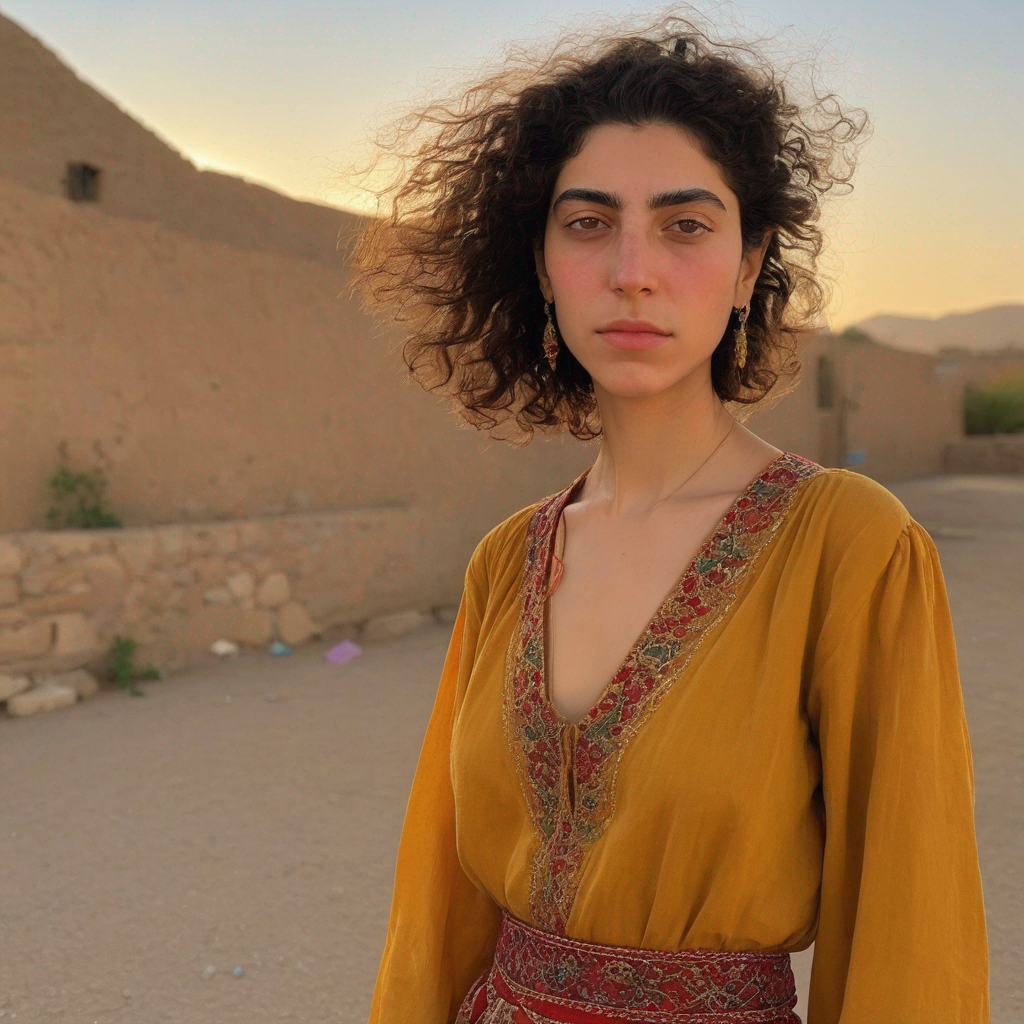
Example Output
Prompt:
"photograph taken with iPhone 12 of a dignified Iranian young woman from TOK who appears 'broken but dignified'. Her appearance should reflect resilience and strength, hinting at past struggles yet maintaining an air of elegance and beauty in style of TOK"
Output
Performance Metrics
16.08s
Prediction Time
26.73s
Total Time
All Input Parameters
{
  "width": 1024,
  "height": 1024,
  "prompt": "photograph taken with iPhone 12 of a dignified Iranian young woman from TOK who appears 'broken but dignified'. Her appearance should reflect resilience and strength, hinting at past struggles yet maintaining an air of elegance and beauty in style of TOK\n",
  "refine": "no_refiner",
  "scheduler": "K_EULER",
  "lora_scale": 0.6,
  "num_outputs": 1,
  "guidance_scale": 7.5,
  "apply_watermark": true,
  "high_noise_frac": 0.8,
  "negative_prompt": "hijab , scarf , black and white , iPhone ,European look , model , posing European look  , Indian , hijab , scarf , deformed, worst quality, text, watermark, logo, banner, extra digits, deformed fingers, deformed hands, cropped, jpeg artefacts, signature, username, error, sketch, duplicate, ugly, monochrome, horror, geometry, mutation, disgusting",
  "prompt_strength": 0.45,
  "num_inference_steps": 50
}
Input Parameters
- mask
- Input mask for inpaint mode. Black areas will be preserved, white areas will be inpainted.
- seed
- Random seed. Leave blank to randomize the seed
- image
- Input image for img2img or inpaint mode
- width
- Width of output image
- height
- Height of output image
- prompt
- Input prompt
- refine
- Which refine style to use
- scheduler
- scheduler
- lora_scale
- LoRA additive scale. Only applicable on trained models.
- num_outputs
- Number of images to output.
- refine_steps
- For base_image_refiner, the number of steps to refine, defaults to num_inference_steps
- guidance_scale
- Scale for classifier-free guidance
- apply_watermark
- Applies a watermark to enable determining if an image is generated in downstream applications. If you have other provisions for generating or deploying images safely, you can use this to disable watermarking.
- high_noise_frac
- For expert_ensemble_refiner, the fraction of noise to use
- negative_prompt
- Input Negative Prompt
- prompt_strength
- Prompt strength when using img2img / inpaint. 1.0 corresponds to full destruction of information in image
- replicate_weights
- Replicate LoRA weights to use. Leave blank to use the default weights.
- num_inference_steps
- Number of denoising steps
- disable_safety_checker
- Disable safety checker for generated images. This feature is only available through the API. See https://replicate.com/docs/how-does-replicate-work#safety
Output Schema
Output
Example Execution Logs
Using seed: 43364
Loading fine-tuned model
Does not have Unet. assume we are using LoRA
Loading Unet LoRA
Prompt: photograph taken with iPhone 12 of a dignified Iranian young woman from <s0><s1> who appears 'broken but dignified'. Her appearance should reflect resilience and strength, hinting at past struggles yet maintaining an air of elegance and beauty in style of <s0><s1>
txt2img mode
  0%|          | 0/50 [00:00<?, ?it/s]
  2%|▏         | 1/50 [00:00<00:13,  3.64it/s]
  4%|▍         | 2/50 [00:00<00:13,  3.64it/s]
  6%|▌         | 3/50 [00:00<00:12,  3.64it/s]
  8%|▊         | 4/50 [00:01<00:12,  3.64it/s]
 10%|█         | 5/50 [00:01<00:12,  3.64it/s]
 12%|█▏        | 6/50 [00:01<00:12,  3.64it/s]
 14%|█▍        | 7/50 [00:01<00:11,  3.64it/s]
 16%|█▌        | 8/50 [00:02<00:11,  3.64it/s]
 18%|█▊        | 9/50 [00:02<00:11,  3.64it/s]
 20%|██        | 10/50 [00:02<00:11,  3.63it/s]
 22%|██▏       | 11/50 [00:03<00:10,  3.63it/s]
 24%|██▍       | 12/50 [00:03<00:10,  3.63it/s]
 26%|██▌       | 13/50 [00:03<00:10,  3.63it/s]
 28%|██▊       | 14/50 [00:03<00:09,  3.63it/s]
 30%|███       | 15/50 [00:04<00:09,  3.63it/s]
 32%|███▏      | 16/50 [00:04<00:09,  3.63it/s]
 34%|███▍      | 17/50 [00:04<00:09,  3.63it/s]
 36%|███▌      | 18/50 [00:04<00:08,  3.63it/s]
 38%|███▊      | 19/50 [00:05<00:08,  3.63it/s]
 40%|████      | 20/50 [00:05<00:08,  3.63it/s]
 42%|████▏     | 21/50 [00:05<00:08,  3.62it/s]
 44%|████▍     | 22/50 [00:06<00:07,  3.62it/s]
 46%|████▌     | 23/50 [00:06<00:07,  3.62it/s]
 48%|████▊     | 24/50 [00:06<00:07,  3.62it/s]
 50%|█████     | 25/50 [00:06<00:06,  3.62it/s]
 52%|█████▏    | 26/50 [00:07<00:06,  3.61it/s]
 54%|█████▍    | 27/50 [00:07<00:06,  3.61it/s]
 56%|█████▌    | 28/50 [00:07<00:06,  3.61it/s]
 58%|█████▊    | 29/50 [00:07<00:05,  3.62it/s]
 60%|██████    | 30/50 [00:08<00:05,  3.62it/s]
 62%|██████▏   | 31/50 [00:08<00:05,  3.62it/s]
 64%|██████▍   | 32/50 [00:08<00:04,  3.61it/s]
 66%|██████▌   | 33/50 [00:09<00:04,  3.62it/s]
 68%|██████▊   | 34/50 [00:09<00:04,  3.62it/s]
 70%|███████   | 35/50 [00:09<00:04,  3.62it/s]
 72%|███████▏  | 36/50 [00:09<00:03,  3.62it/s]
 74%|███████▍  | 37/50 [00:10<00:03,  3.62it/s]
 76%|███████▌  | 38/50 [00:10<00:03,  3.61it/s]
 78%|███████▊  | 39/50 [00:10<00:03,  3.62it/s]
 80%|████████  | 40/50 [00:11<00:02,  3.62it/s]
 82%|████████▏ | 41/50 [00:11<00:02,  3.62it/s]
 84%|████████▍ | 42/50 [00:11<00:02,  3.62it/s]
 86%|████████▌ | 43/50 [00:11<00:01,  3.61it/s]
 88%|████████▊ | 44/50 [00:12<00:01,  3.61it/s]
 90%|█████████ | 45/50 [00:12<00:01,  3.61it/s]
 92%|█████████▏| 46/50 [00:12<00:01,  3.61it/s]
 94%|█████████▍| 47/50 [00:12<00:00,  3.61it/s]
 96%|█████████▌| 48/50 [00:13<00:00,  3.61it/s]
 98%|█████████▊| 49/50 [00:13<00:00,  3.61it/s]
100%|██████████| 50/50 [00:13<00:00,  3.61it/s]
100%|██████████| 50/50 [00:13<00:00,  3.62it/s]
Version Details
- Version ID
bc6d605d1f225e3b8a079264741ab08ea568a17f742fbf0834c527b4d6052dd0- Version Created
- January 8, 2024