iordcalin/material-transfer 🔢📝❓🖼️✓ → 🖼️
Performance
11.7sTypical run time
9.4KTotal runs
About
Transfer a material from an image to a subject
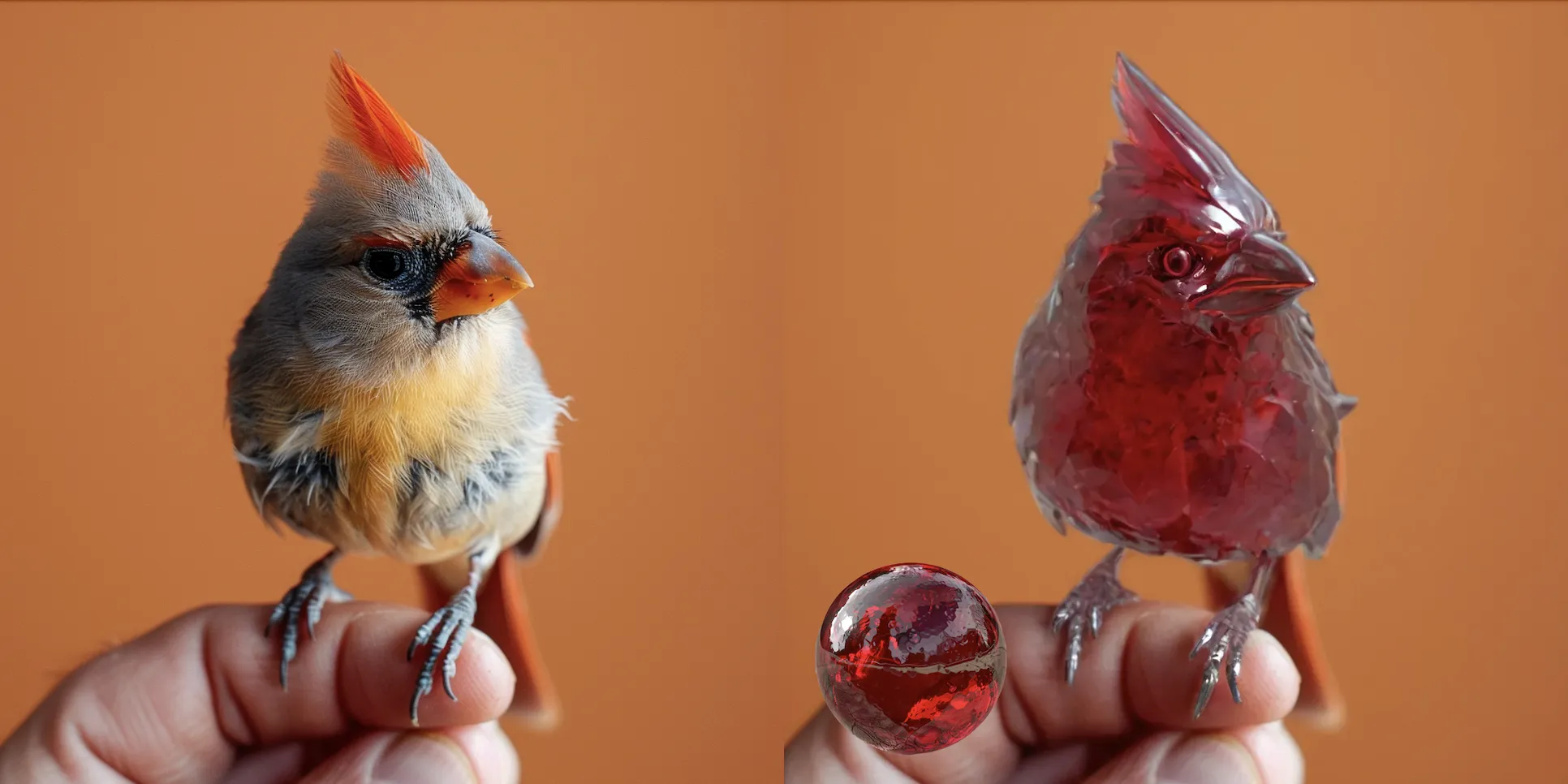
Example Output
Prompt:
"delicate ruby model of a bird"
Output
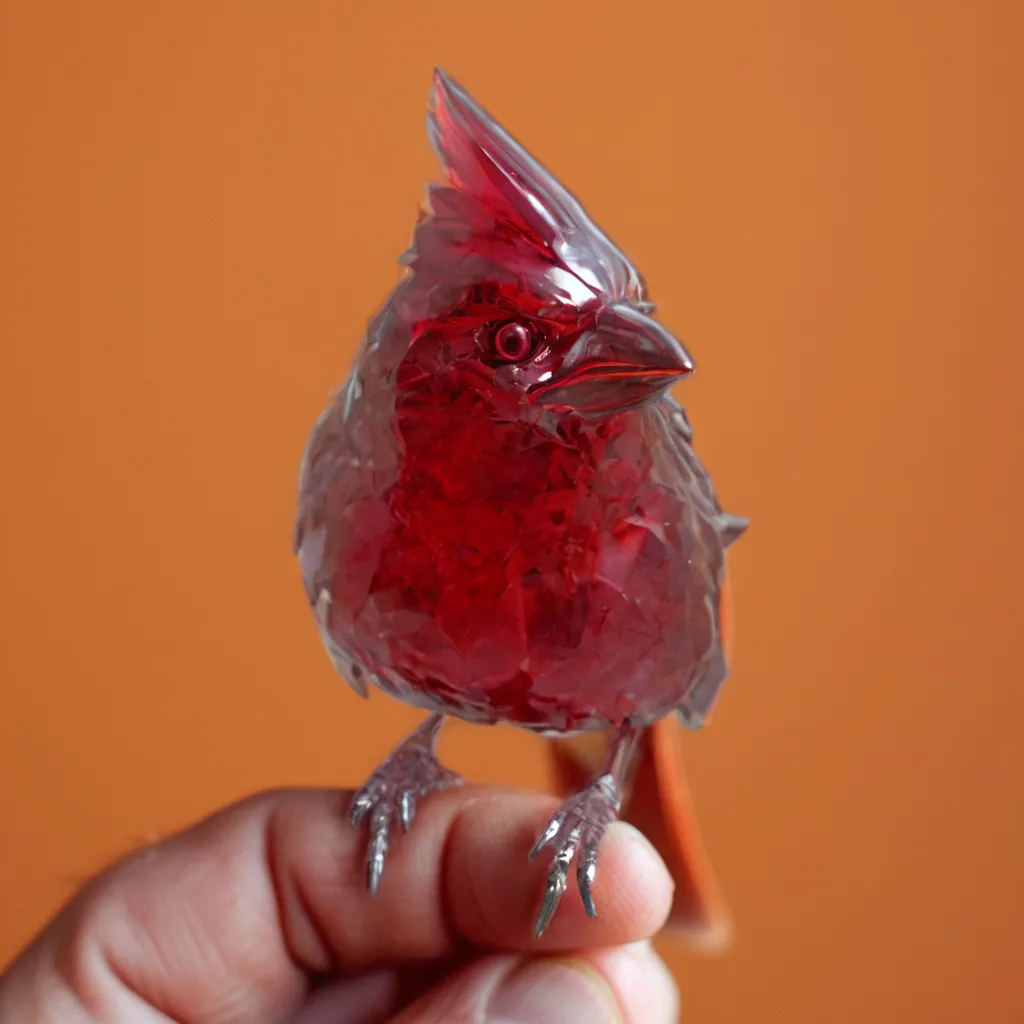
Performance Metrics
11.73s
Prediction Time
11.77s
Total Time
All Input Parameters
{
  "steps": 12,
  "prompt": "delicate ruby model of a bird",
  "max_width": 1920,
  "max_height": 1920,
  "output_format": "webp",
  "subject_image": "https://replicate.delivery/pbxt/KqS0LyQoJuCpq0D0eQEmcKVuFtT7WJfuxb1pxmaLtk7kpwSt/image.png",
  "guidance_scale": 2,
  "material_image": "https://replicate.delivery/pbxt/KqS0L9BvaN0MsGQ5v9X1AIuzCbeb5jXYWDVRqmQelQB2qPGP/image.png",
  "output_quality": 80,
  "material_strength": "medium",
  "return_intermediate_images": false
}
Input Parameters
- seed
- Set a seed for reproducibility. Random by default.
- steps
- Number of steps. 6 steps gives good results, but try increasing to 15 or 20 if you need more detail
- prompt
- Use a prompt that describe the image when the material is applied
- max_width
- Max width of the output image
- max_height
- Max height of the output image
- output_format
- Format of the output images
- subject_image (required)
- Subject image to transfer the material to
- guidance_scale
- Guidance scale for the diffusion process
- material_image (required)
- Material to transfer to the input image
- output_quality
- Quality of the output images, from 0 to 100. 100 is best quality, 0 is lowest quality.
- negative_prompt
- What you do not want to see in the image
- material_strength
- Strength of the material
- return_intermediate_images
- Return intermediate images like mask, and annotated images. Useful for debugging.
Output Schema
Output
Example Execution Logs
Random seed set to: 1637856312
Checking inputs
✅ /tmp/inputs/subject.png
✅ /tmp/inputs/material.png
====================================
Checking weights
Including weights for IPAdapter preset: STANDARD (medium strength)
✅ sk_model2.pth
✅ ip-adapter_sd15.safetensors
✅ ip-adapter_sdxl_vit-h.safetensors
✅ t2i-adapter_diffusers_xl_lineart.safetensors
✅ depth_anything_vitb14.pth
✅ depth_anything_vitl14.pth
✅ CLIP-ViT-H-14-laion2B-s32B-b79K.safetensors
✅ depth_anything_vits14.pth
✅ t2i-adapter_diffusers_xl_depth_midas.safetensors
✅ juggernautXL_juggernautX.safetensors
✅ sk_model.pth
====================================
Running workflow
got prompt
Executing node 46, title: Load Image, class type: LoadImage
Executing node 47, title: 🔧 Image Crop, class type: ImageCrop+
Executing node 58, title: Preview Image, class type: PreviewImage
Executing node 45, title: IPAdapter Advanced, class type: IPAdapterAdvanced
Executing node 48, title: Differential Diffusion, class type: DifferentialDiffusion
Executing node 49, title: RescaleCFG, class type: RescaleCFG
Executing node 6, title: CLIP Text Encode (Prompt), class type: CLIPTextEncode
Executing node 41, title: InpaintModelConditioning, class type: InpaintModelConditioning
Executing node 50, title: Apply ControlNet (Advanced), class type: ControlNetApplyAdvanced
Executing node 52, title: Apply ControlNet (Advanced), class type: ControlNetApplyAdvanced
Executing node 10, title: KSampler (Efficient), class type: KSampler (Efficient)
Requested to load SDXL
Loading 1 new model
  0%|          | 0/12 [00:00<?, ?it/s]
  8%|▊         | 1/12 [00:00<00:08,  1.33it/s]
 17%|█▋        | 2/12 [00:01<00:05,  1.73it/s]
 25%|██▌       | 3/12 [00:01<00:04,  1.91it/s]
 33%|███▎      | 4/12 [00:02<00:03,  2.01it/s]
 42%|████▏     | 5/12 [00:02<00:03,  2.08it/s]
 50%|█████     | 6/12 [00:03<00:02,  2.12it/s]
 58%|█████▊    | 7/12 [00:03<00:02,  2.15it/s]
 67%|██████▋   | 8/12 [00:03<00:01,  2.17it/s]
 75%|███████▌  | 9/12 [00:04<00:01,  2.18it/s]
 83%|████████▎ | 10/12 [00:04<00:00,  2.21it/s]
 92%|█████████▏| 11/12 [00:05<00:00,  2.27it/s]
100%|██████████| 12/12 [00:05<00:00,  2.72it/s]
100%|██████████| 12/12 [00:05<00:00,  2.21it/s]
Executing node 9, title: Save Image, class type: SaveImage
Prompt executed in 8.05 seconds
outputs:  {'56': {'images': [{'filename': 'ComfyUI_temp_sxdyu_00001_.png', 'subfolder': '', 'type': 'temp'}]}, '57': {'images': [{'filename': 'ComfyUI_temp_mvubh_00001_.png', 'subfolder': '', 'type': 'temp'}]}, '39': {'images': [{'filename': 'ComfyUI_temp_oessj_00001_.png', 'subfolder': '', 'type': 'temp'}]}, '40': {'images': [{'filename': 'ComfyUI_temp_pecmx_00001_.png', 'subfolder': '', 'type': 'temp'}]}, '58': {'images': [{'filename': 'ComfyUI_temp_qjpvz_00001_.png', 'subfolder': '', 'type': 'temp'}]}, '10': {'images': [{'filename': 'ComfyUI_temp_ygbim_00001_.png', 'subfolder': '', 'type': 'temp'}]}, '9': {'images': [{'filename': 'ComfyUI_00001_.png', 'subfolder': '', 'type': 'output'}]}}
====================================
Contents of /tmp/outputs:
ComfyUI_00001_.png
Version Details
- Version ID
2f640c887323bae445f8b5154d010b2d31c336dd5f3a1d85acd5ae04d215dea0- Version Created
- May 1, 2024