naishagarwal/vaporwave-model 🖼️🔢📝❓✓ → 🖼️
Performance
23.1sTypical run time
706Total runs
About
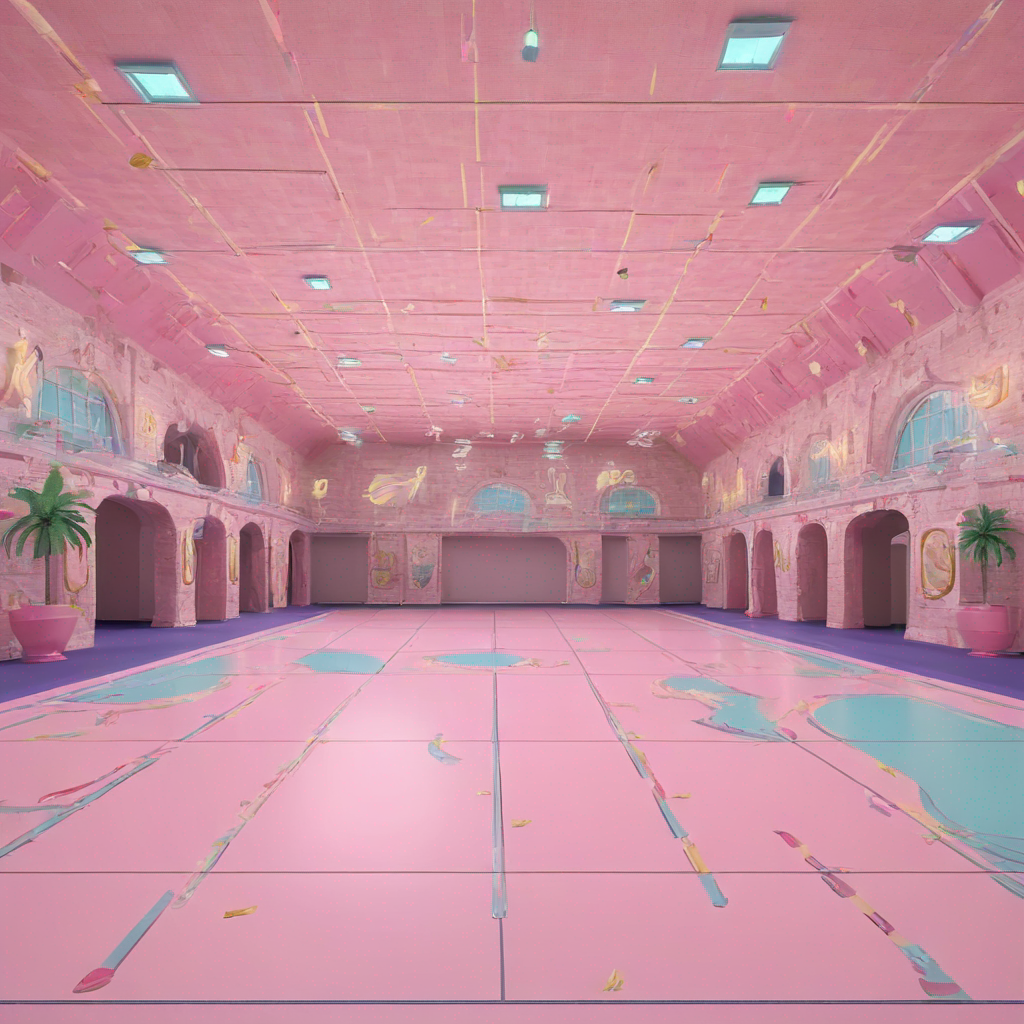
Example Output
Prompt:
"in the style of TOK, a roller skating rink"
Output
Performance Metrics
23.05s
Prediction Time
24.29s
Total Time
All Input Parameters
{
  "width": 1024,
  "height": 1024,
  "prompt": "in the style of TOK, a roller skating rink",
  "refine": "no_refiner",
  "scheduler": "K_EULER",
  "lora_scale": 0.6,
  "num_outputs": 1,
  "guidance_scale": 7.5,
  "apply_watermark": true,
  "high_noise_frac": 0.8,
  "negative_prompt": "underexposed",
  "prompt_strength": 0.8,
  "num_inference_steps": 50
}
Input Parameters
- mask
- Input mask for inpaint mode. Black areas will be preserved, white areas will be inpainted.
- seed
- Random seed. Leave blank to randomize the seed
- image
- Input image for img2img or inpaint mode
- width
- Width of output image
- height
- Height of output image
- prompt
- Input prompt
- refine
- Which refine style to use
- scheduler
- scheduler
- lora_scale
- LoRA additive scale. Only applicable on trained models.
- num_outputs
- Number of images to output.
- refine_steps
- For base_image_refiner, the number of steps to refine, defaults to num_inference_steps
- guidance_scale
- Scale for classifier-free guidance
- apply_watermark
- Applies a watermark to enable determining if an image is generated in downstream applications. If you have other provisions for generating or deploying images safely, you can use this to disable watermarking.
- high_noise_frac
- For expert_ensemble_refiner, the fraction of noise to use
- negative_prompt
- Input Negative Prompt
- prompt_strength
- Prompt strength when using img2img / inpaint. 1.0 corresponds to full destruction of information in image
- replicate_weights
- Replicate LoRA weights to use. Leave blank to use the default weights.
- num_inference_steps
- Number of denoising steps
- disable_safety_checker
- Disable safety checker for generated images. This feature is only available through the API. See [https://replicate.com/docs/how-does-replicate-work#safety](https://replicate.com/docs/how-does-replicate-work#safety)
Output Schema
Output
Example Execution Logs
Using seed: 8651
Ensuring enough disk space...
Free disk space: 1880333225984
Downloading weights: https://replicate.delivery/pbxt/Pq0d0DKbgLaACB75vZuzyPNRRtuCHPHRfgsaBb271xfTGKTTA/trained_model.tar
2024-08-16T06:22:51Z | INFO  | [ Initiating ] chunk_size=150M dest=/src/weights-cache/9dd41bb8a35f2aff url=https://replicate.delivery/pbxt/Pq0d0DKbgLaACB75vZuzyPNRRtuCHPHRfgsaBb271xfTGKTTA/trained_model.tar
2024-08-16T06:22:57Z | INFO  | [ Complete ] dest=/src/weights-cache/9dd41bb8a35f2aff size="186 MB" total_elapsed=6.408s url=https://replicate.delivery/pbxt/Pq0d0DKbgLaACB75vZuzyPNRRtuCHPHRfgsaBb271xfTGKTTA/trained_model.tar
b''
Downloaded weights in 6.553469181060791 seconds
Loading fine-tuned model
Does not have Unet. assume we are using LoRA
Loading Unet LoRA
Prompt: in the style of <s0><s1>, a roller skating rink
txt2img mode
  0%|          | 0/50 [00:00<?, ?it/s]/usr/local/lib/python3.9/site-packages/diffusers/models/attention_processor.py:1946: FutureWarning: `LoRAAttnProcessor2_0` is deprecated and will be removed in version 0.26.0. Make sure use AttnProcessor2_0 instead by settingLoRA layers to `self.{to_q,to_k,to_v,to_out[0]}.lora_layer` respectively. This will be done automatically when using `LoraLoaderMixin.load_lora_weights`
deprecate(
  2%|▏         | 1/50 [00:00<00:11,  4.26it/s]
  4%|▍         | 2/50 [00:00<00:11,  4.24it/s]
  6%|▌         | 3/50 [00:00<00:11,  4.23it/s]
  8%|▊         | 4/50 [00:00<00:10,  4.24it/s]
 10%|█         | 5/50 [00:01<00:10,  4.24it/s]
 12%|█▏        | 6/50 [00:01<00:10,  4.25it/s]
 14%|█▍        | 7/50 [00:01<00:10,  4.25it/s]
 16%|█▌        | 8/50 [00:01<00:09,  4.25it/s]
 18%|█▊        | 9/50 [00:02<00:09,  4.25it/s]
 20%|██        | 10/50 [00:02<00:09,  4.25it/s]
 22%|██▏       | 11/50 [00:02<00:09,  4.25it/s]
 24%|██▍       | 12/50 [00:02<00:08,  4.25it/s]
 26%|██▌       | 13/50 [00:03<00:08,  4.25it/s]
 28%|██▊       | 14/50 [00:03<00:08,  4.25it/s]
 30%|███       | 15/50 [00:03<00:08,  4.25it/s]
 32%|███▏      | 16/50 [00:03<00:08,  4.25it/s]
 34%|███▍      | 17/50 [00:04<00:07,  4.25it/s]
 36%|███▌      | 18/50 [00:04<00:07,  4.25it/s]
 38%|███▊      | 19/50 [00:04<00:07,  4.24it/s]
 40%|████      | 20/50 [00:04<00:07,  4.24it/s]
 42%|████▏     | 21/50 [00:04<00:06,  4.24it/s]
 44%|████▍     | 22/50 [00:05<00:06,  4.24it/s]
 46%|████▌     | 23/50 [00:05<00:06,  4.24it/s]
 48%|████▊     | 24/50 [00:05<00:06,  4.24it/s]
 50%|█████     | 25/50 [00:05<00:05,  4.24it/s]
 52%|█████▏    | 26/50 [00:06<00:05,  4.24it/s]
 54%|█████▍    | 27/50 [00:06<00:05,  4.24it/s]
 56%|█████▌    | 28/50 [00:06<00:05,  4.24it/s]
 58%|█████▊    | 29/50 [00:06<00:04,  4.24it/s]
 60%|██████    | 30/50 [00:07<00:04,  4.23it/s]
 62%|██████▏   | 31/50 [00:07<00:04,  4.23it/s]
 64%|██████▍   | 32/50 [00:07<00:04,  4.23it/s]
 66%|██████▌   | 33/50 [00:07<00:04,  4.23it/s]
 68%|██████▊   | 34/50 [00:08<00:03,  4.23it/s]
 70%|███████   | 35/50 [00:08<00:03,  4.23it/s]
 72%|███████▏  | 36/50 [00:08<00:03,  4.23it/s]
 74%|███████▍  | 37/50 [00:08<00:03,  4.22it/s]
 76%|███████▌  | 38/50 [00:08<00:02,  4.22it/s]
 78%|███████▊  | 39/50 [00:09<00:02,  4.22it/s]
 80%|████████  | 40/50 [00:09<00:02,  4.22it/s]
 82%|████████▏ | 41/50 [00:09<00:02,  4.22it/s]
 84%|████████▍ | 42/50 [00:09<00:01,  4.22it/s]
 86%|████████▌ | 43/50 [00:10<00:01,  4.22it/s]
 88%|████████▊ | 44/50 [00:10<00:01,  4.22it/s]
 90%|█████████ | 45/50 [00:10<00:01,  4.22it/s]
 92%|█████████▏| 46/50 [00:10<00:00,  4.22it/s]
 94%|█████████▍| 47/50 [00:11<00:00,  4.21it/s]
 96%|█████████▌| 48/50 [00:11<00:00,  4.21it/s]
 98%|█████████▊| 49/50 [00:11<00:00,  4.21it/s]
100%|██████████| 50/50 [00:11<00:00,  4.21it/s]
100%|██████████| 50/50 [00:11<00:00,  4.23it/s]
Version Details
- Version ID
b7d144ad3297425f0cf99fdf98a9450791592c15755626ad2d41bdeb2fdd45c4- Version Created
- December 18, 2024