GPT-Image-1 — OpenAI's Image Generation Model 📝❓🖼️🔢 → 🖼️
Performance
Compute billed by the provider (bring your own API key)
Data sampled 2026-10-11
GPT-Image-1 is OpenAI's image generation model, available on Replicate for quick testing and API access. Note that it requires your own verified OpenAI API key and bills usage to your OpenAI account.
About
GPT-Image-1 is OpenAI's dedicated image generation model, built to produce high-quality visuals from text prompts. It handles photorealistic scenes, illustrations, diagrams, and — unusually for an image model — text rendered inside the image, which makes it a strong fit for posters, ad creative, UI mockups, and infographics.
A key thing to know before you start: on Replicate this model runs as a passthrough to OpenAI. You must supply your own verified OpenAI API key (openai_api_key is a required input), and usage is billed to your OpenAI account rather than by Replicate GPU time.
How it compares to other image models on Replicate
| Model | Type | Key strength | Billing model |
|---|---|---|---|
| openai/gpt-image-1 | Text-to-image + image editing | Accurate in-image text, strong prompt adherence, transparent backgrounds | Your own OpenAI key (billed by OpenAI) |
| black-forest-labs/flux-1.1-pro | Text-to-image | Fast, photorealistic scenes | Per run on Replicate |
| stability-ai/sdxl | Text-to-image | Open weights, large LoRA / fine-tune ecosystem | Per run on Replicate |
| google/imagen-4 | Text-to-image | Photorealistic detail and typography | Per run on Replicate |
Key inputs that matter
prompt(required) — supports long, detailed, multi-part descriptions.openai_api_key(required) — bring your own verified OpenAI key.input_images— pass existing images to edit or compose from, not just generate from scratch.background— supports transparent backgrounds, useful for logos, stickers, and overlays.aspect_ratio/quality/number_of_images— control shape, fidelity, and batch size.moderation— OpenAI's content filtering is applied and configurable here.
When to use this model
- Images that need legible text — posters, ads, slides, infographics.
- Editing or compositing existing images via
input_images. - Transparent-background assets for design work.
- Prompts with complex spatial relationships or multiple objects.
When to reach for something else
- You don't want to manage a verified OpenAI account and key — try flux-1.1-pro or SDXL.
- You need custom styles via LoRA / fine-tuning — SDXL's ecosystem is far larger.
- You need the lowest latency — generation here takes tens of seconds per image.
Limitations and gotchas
- Requires a verified OpenAI account; new or unverified keys are rejected.
- Usage is billed by OpenAI, so Replicate's per-run pricing does not apply.
- Content moderation is enforced and cannot be fully disabled.
- Not open weights — no LoRA, no self-hosted fine-tuning.
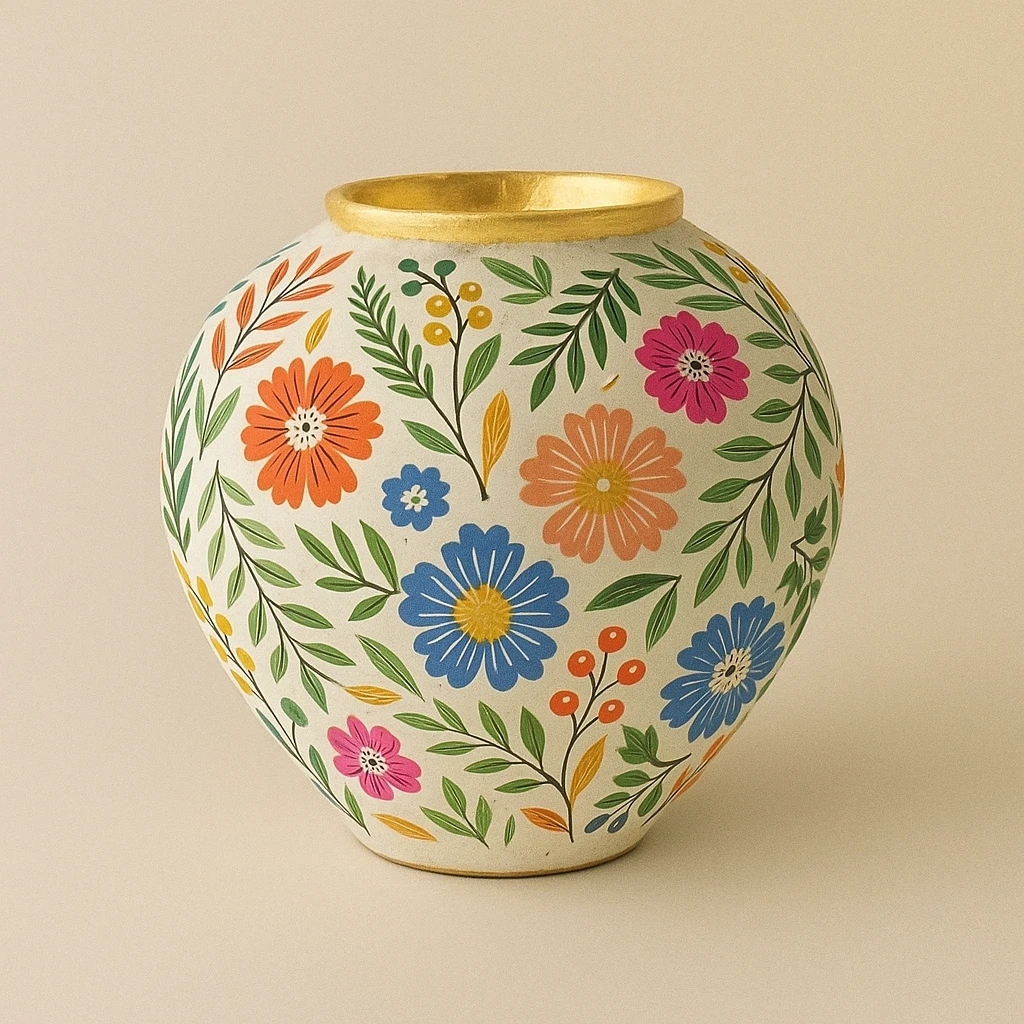
Example Output
"Add the floral pattern to the vase"
Output
Performance Metrics
All Input Parameters
{
  "prompt": "Add the floral pattern to the vase",
  "quality": "auto",
  "background": "auto",
  "moderation": "auto",
  "aspect_ratio": "1:1",
  "input_images": [
    "https://replicate.delivery/pbxt/MusWuQJm1RJPu1Cj0ajRmoMnHyYNPk6ljT1QCU4DbHMsqDTF/53541851-62f3-44a7-b075-ef053ae2f324.jpg",
    "https://replicate.delivery/pbxt/MusWuPkfcvyZQuuXeMIbQXEMe9K2G8rDCNraQffAt0OzMRaT/colored-flower-pattern-free-vector.jpg"
  ],
  "output_format": "webp",
  "openai_api_key": "[REDACTED]",
  "number_of_images": 1,
  "output_compression": 90
}
Input Parameters
- prompt (required)
- A text description of the desired image
- quality
- The quality of the generated image
- user_id
- An optional unique identifier representing your end-user. This helps OpenAI monitor and detect abuse.
- background
- Set whether the background is transparent or opaque or choose automatically
- moderation
- Content moderation level
- aspect_ratio
- The aspect ratio of the generated image
- input_images
- A list of images to use as input for the generation
- output_format
- Output format
- input_fidelity
- Control how much effort the model will exert to match the style and features, especially facial features, of input images
- openai_api_key (required)
- Your OpenAI API key
- number_of_images
- Number of images to generate (1-10)
- output_compression
- Compression level (0-100%)
Output Schema
Output
Example Execution Logs
Generating image...
Image size: 378.3KB
Image size: 303.0KB
Generated image in 45.6sec
Generated 1 images
Input text token count: 711
Input image token count: 646
Output token count: 4160
Version Details
- Version ID
5ac56c15446a60fa63b3823de926ada90f5971c2cf9b1dd07659126cfda434e6- Version Created
- September 22, 2025