prompthunt/cog-sdxl-controlnet-inference 🖼️🔢📝❓✓ → 🖼️
Performance
14.1sTypical run time
326Total runs
About
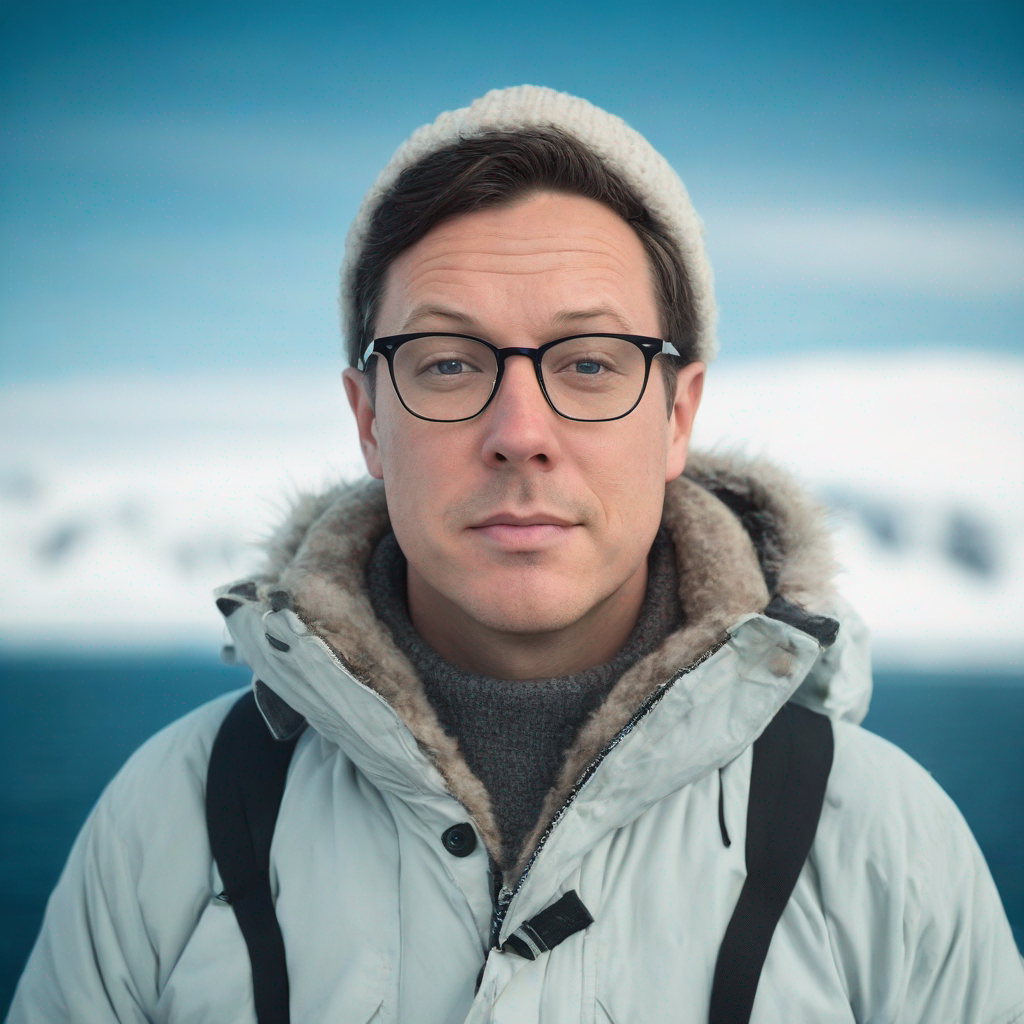
Example Output
Prompt:
"((Moody portrait)) of TOK man wearing glasses dressed in arctic fashion against an arctic backdrop with iceberg influences, perfect eyes"
Output
Performance Metrics
14.05s
Prediction Time
14.11s
Total Time
All Input Parameters
{
  "seed": 1234,
  "image": "https://replicate.delivery/pbxt/JtBXIeco0ymI5gPV7hbpb3N8gjPGQePmadfUmXV6njkeM7E9/w1024.jpeg",
  "width": 1024,
  "height": 1024,
  "prompt": "((Moody portrait)) of TOK man wearing glasses dressed in arctic fashion against an arctic backdrop with iceberg influences, perfect eyes",
  "refine": "no_refiner",
  "scheduler": "K_EULER",
  "lora_scale": 0.6,
  "num_outputs": 1,
  "lora_weights": "https://replicate.delivery/pbxt/yuebGYwbnLUIbiFtTk4tjkkO2BJMcPheYILs7vy7MnzMpB5RA/trained_model.tar",
  "controlnet_end": 1,
  "guidance_scale": 3,
  "apply_watermark": true,
  "high_noise_frac": 0.8,
  "negative_prompt": "defined jawline, plastic, blurry, grainy, [deformed | disfigured], poorly drawn, [bad : wrong] anatomy, [extra | missing | floating | disconnected] limb, (mutated hands and fingers), blurry",
  "prompt_strength": 0.8,
  "controlnet_start": 0,
  "num_inference_steps": 25,
  "controlnet_conditioning_scale": 0.5
}
Input Parameters
- mask
- Input mask for inpaint mode. Black areas will be preserved, white areas will be inpainted.
- seed
- Random seed. Leave blank to randomize the seed
- image
- Input image for img2img or inpaint mode
- width
- Width of output image
- height
- Height of output image
- prompt
- Input prompt
- refine
- Which refine style to use
- scheduler
- scheduler
- lora_scale
- LoRA additive scale. Only applicable on trained models.
- pose_image
- Pose image for controlnet
- num_outputs
- Number of images to output.
- lora_weights
- LoRA weights to use. Leave blank to use the default weights.
- refine_steps
- For base_image_refiner, the number of steps to refine, defaults to num_inference_steps
- controlnet_end
- When controlnet conditioning ends
- guidance_scale
- Scale for classifier-free guidance
- apply_watermark
- Applies a watermark to enable determining if an image is generated in downstream applications. If you have other provisions for generating or deploying images safely, you can use this to disable watermarking.
- high_noise_frac
- For expert_ensemble_refiner, the fraction of noise to use
- negative_prompt
- Input Negative Prompt
- prompt_strength
- Prompt strength when using img2img / inpaint. 1.0 corresponds to full destruction of information in image
- controlnet_start
- When controlnet conditioning starts
- num_inference_steps
- Number of denoising steps
- disable_safety_checker
- Disable safety checker for generated images. This feature is only available through the API. See [https://replicate.com/docs/how-does-replicate-work#safety](https://replicate.com/docs/how-does-replicate-work#safety)
- controlnet_conditioning_scale
- How strong the controlnet conditioning is
Output Schema
Output
Example Execution Logs
Using seed: 1234
Loading sdxl txt2img pipeline...
Loading pipeline components...:   0%|          | 0/7 [00:00<?, ?it/s]
Loading pipeline components...:  29%|██▊       | 2/7 [00:00<00:00,  6.99it/s]
Loading pipeline components...:  57%|█████▋    | 4/7 [00:00<00:00,  6.95it/s]
Loading pipeline components...:  86%|████████▌ | 6/7 [00:01<00:00,  5.11it/s]
Loading pipeline components...: 100%|██████████| 7/7 [00:01<00:00,  6.08it/s]
Loading fine-tuned model
Does not have Unet. assume we are using LoRA
Loading Unet LoRA
Loading SDXL img2img pipeline...
Loading SDXL inpaint pipeline...
Loading controlnet model
img2img mode
Prompt: ((Moody portrait)) of <s0><s1> man wearing glasses dressed in arctic fashion against an arctic backdrop with iceberg influences, perfect eyes
  0%|          | 0/20 [00:00<?, ?it/s]
  5%|▌         | 1/20 [00:00<00:05,  3.69it/s]
 10%|█         | 2/20 [00:00<00:04,  3.68it/s]
 15%|█▌        | 3/20 [00:00<00:04,  3.68it/s]
 20%|██        | 4/20 [00:01<00:04,  3.67it/s]
 25%|██▌       | 5/20 [00:01<00:04,  3.67it/s]
 30%|███       | 6/20 [00:01<00:03,  3.67it/s]
 35%|███▌      | 7/20 [00:01<00:03,  3.68it/s]
 40%|████      | 8/20 [00:02<00:03,  3.68it/s]
 45%|████▌     | 9/20 [00:02<00:02,  3.68it/s]
 50%|█████     | 10/20 [00:02<00:02,  3.68it/s]
 55%|█████▌    | 11/20 [00:02<00:02,  3.68it/s]
 60%|██████    | 12/20 [00:03<00:02,  3.68it/s]
 65%|██████▌   | 13/20 [00:03<00:01,  3.68it/s]
 70%|███████   | 14/20 [00:03<00:01,  3.68it/s]
 75%|███████▌  | 15/20 [00:04<00:01,  3.68it/s]
 80%|████████  | 16/20 [00:04<00:01,  3.68it/s]
 85%|████████▌ | 17/20 [00:04<00:00,  3.68it/s]
 90%|█████████ | 18/20 [00:04<00:00,  3.68it/s]
 95%|█████████▌| 19/20 [00:05<00:00,  3.68it/s]
100%|██████████| 20/20 [00:05<00:00,  3.68it/s]
100%|██████████| 20/20 [00:05<00:00,  3.68it/s]
Version Details
- Version ID
c748f859defb73fe0679ce88bf56c8c203cd9bbe4e81be20325ad65c041a7641- Version Created
- November 16, 2023