aperture-2/hido 🖼️🔢❓📝✓ → 🖼️
Performance
15.5sTypical run time
~31sCold start (first call)
215Total runs
About
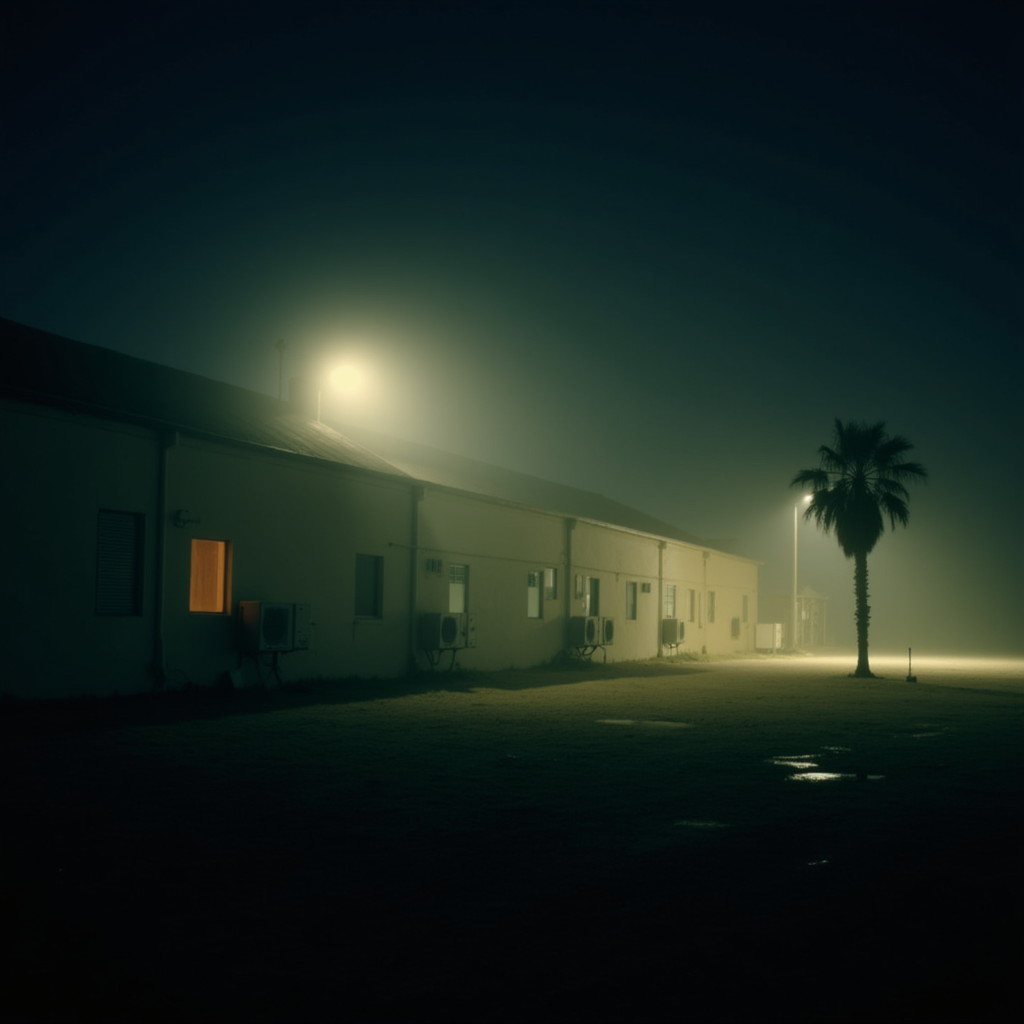
Example Output
Prompt:
"A photo of a long, industrial building at night, with a single illuminated window casting a warm glow in the otherwise dimly lit scene. The building’s exterior is plain, with numerous air conditioning units dotting its surface, and the foggy atmosphere adds a layer of mystery and eeriness. The ground is wet, with puddles reflecting the faint light, and a lone palm tree is barely visible through the mist. The muted tones and desolate setting evoke a sense of isolation and quiet unease. In the style of HIDO"
Output
Performance Metrics
15.53s
Prediction Time
31.34s
Total Time
All Input Parameters
{
  "model": "dev",
  "width": 1024,
  "height": 1024,
  "prompt": "A photo of a long, industrial building at night, with a single illuminated window casting a warm glow in the otherwise dimly lit scene. The building’s exterior is plain, with numerous air conditioning units dotting its surface, and the foggy atmosphere adds a layer of mystery and eeriness. The ground is wet, with puddles reflecting the faint light, and a lone palm tree is barely visible through the mist. The muted tones and desolate setting evoke a sense of isolation and quiet unease. In the style of HIDO\n",
  "lora_scale": 1,
  "num_outputs": 1,
  "aspect_ratio": "1:1",
  "output_format": "png",
  "guidance_scale": 3.5,
  "output_quality": 100,
  "extra_lora_scale": 0.8,
  "num_inference_steps": 28
}
Input Parameters
- mask
- Image mask for image inpainting mode. If provided, aspect_ratio, width, and height inputs are ignored.
- seed
- Random seed. Set for reproducible generation
- image
- Input image for image to image or inpainting mode. If provided, aspect_ratio, width, and height inputs are ignored.
- model
- Which model to run inference with. The dev model performs best with around 28 inference steps but the schnell model only needs 4 steps.
- width
- Width of generated image. Only works if `aspect_ratio` is set to custom. Will be rounded to nearest multiple of 16. Incompatible with fast generation
- height
- Height of generated image. Only works if `aspect_ratio` is set to custom. Will be rounded to nearest multiple of 16. Incompatible with fast generation
- prompt (required)
- Prompt for generated image. If you include the `trigger_word` used in the training process you are more likely to activate the trained object, style, or concept in the resulting image.
- go_fast
- Run faster predictions with model optimized for speed (currently fp8 quantized); disable to run in original bf16
- extra_lora
- Load LoRA weights. Supports Replicate models in the format <owner>/<username> or <owner>/<username>/<version>, HuggingFace URLs in the format huggingface.co/<owner>/<model-name>, CivitAI URLs in the format civitai.com/models/<id>[/<model-name>], or arbitrary .safetensors URLs from the Internet. For example, 'fofr/flux-pixar-cars'
- lora_scale
- Determines how strongly the main LoRA should be applied. Sane results between 0 and 1 for base inference. For go_fast we apply a 1.5x multiplier to this value; we've generally seen good performance when scaling the base value by that amount. You may still need to experiment to find the best value for your particular lora.
- megapixels
- Approximate number of megapixels for generated image
- num_outputs
- Number of outputs to generate
- aspect_ratio
- Aspect ratio for the generated image. If custom is selected, uses height and width below & will run in bf16 mode
- output_format
- Format of the output images
- guidance_scale
- Guidance scale for the diffusion process. Lower values can give more realistic images. Good values to try are 2, 2.5, 3 and 3.5
- output_quality
- Quality when saving the output images, from 0 to 100. 100 is best quality, 0 is lowest quality. Not relevant for .png outputs
- prompt_strength
- Prompt strength when using img2img. 1.0 corresponds to full destruction of information in image
- extra_lora_scale
- Determines how strongly the extra LoRA should be applied. Sane results between 0 and 1 for base inference. For go_fast we apply a 1.5x multiplier to this value; we've generally seen good performance when scaling the base value by that amount. You may still need to experiment to find the best value for your particular lora.
- replicate_weights
- Load LoRA weights. Supports Replicate models in the format <owner>/<username> or <owner>/<username>/<version>, HuggingFace URLs in the format huggingface.co/<owner>/<model-name>, CivitAI URLs in the format civitai.com/models/<id>[/<model-name>], or arbitrary .safetensors URLs from the Internet. For example, 'fofr/flux-pixar-cars'
- num_inference_steps
- Number of denoising steps. More steps can give more detailed images, but take longer.
- disable_safety_checker
- Disable safety checker for generated images.
Output Schema
Output
Example Execution Logs
Using seed: 62022
Prompt: A photo of a long, industrial building at night, with a single illuminated window casting a warm glow in the otherwise dimly lit scene. The building’s exterior is plain, with numerous air conditioning units dotting its surface, and the foggy atmosphere adds a layer of mystery and eeriness. The ground is wet, with puddles reflecting the faint light, and a lone palm tree is barely visible through the mist. The muted tones and desolate setting evoke a sense of isolation and quiet unease. In the style of HIDO
txt2img mode
Using dev model
Loaded LoRAs in 7.15s
The following part of your input was truncated because CLIP can only handle sequences up to 77 tokens: ['tree is barely visible through the mist. the muted tones and desolate setting evoke a sense of isolation and quiet unease. in the style of hido']
  0%|          | 0/28 [00:00<?, ?it/s]
  4%|▎         | 1/28 [00:00<00:07,  3.66it/s]
  7%|▋         | 2/28 [00:00<00:06,  4.19it/s]
 11%|█         | 3/28 [00:00<00:06,  3.92it/s]
 14%|█▍        | 4/28 [00:01<00:06,  3.81it/s]
 18%|█▊        | 5/28 [00:01<00:06,  3.75it/s]
 21%|██▏       | 6/28 [00:01<00:05,  3.71it/s]
 25%|██▌       | 7/28 [00:01<00:05,  3.68it/s]
 29%|██▊       | 8/28 [00:02<00:05,  3.67it/s]
 32%|███▏      | 9/28 [00:02<00:05,  3.67it/s]
 36%|███▌      | 10/28 [00:02<00:04,  3.66it/s]
 39%|███▉      | 11/28 [00:02<00:04,  3.65it/s]
 43%|████▎     | 12/28 [00:03<00:04,  3.65it/s]
 46%|████▋     | 13/28 [00:03<00:04,  3.65it/s]
 50%|█████     | 14/28 [00:03<00:03,  3.65it/s]
 54%|█████▎    | 15/28 [00:04<00:03,  3.64it/s]
 57%|█████▋    | 16/28 [00:04<00:03,  3.65it/s]
 61%|██████    | 17/28 [00:04<00:03,  3.65it/s]
 64%|██████▍   | 18/28 [00:04<00:02,  3.64it/s]
 68%|██████▊   | 19/28 [00:05<00:02,  3.64it/s]
 71%|███████▏  | 20/28 [00:05<00:02,  3.64it/s]
 75%|███████▌  | 21/28 [00:05<00:01,  3.65it/s]
 79%|███████▊  | 22/28 [00:05<00:01,  3.64it/s]
 82%|████████▏ | 23/28 [00:06<00:01,  3.64it/s]
 86%|████████▌ | 24/28 [00:06<00:01,  3.65it/s]
 89%|████████▉ | 25/28 [00:06<00:00,  3.65it/s]
 93%|█████████▎| 26/28 [00:07<00:00,  3.65it/s]
 96%|█████████▋| 27/28 [00:07<00:00,  3.64it/s]
100%|██████████| 28/28 [00:07<00:00,  3.65it/s]
100%|██████████| 28/28 [00:07<00:00,  3.67it/s]
Version Details
- Version ID
19162dfe9d2cec64f84d51c4459724f26fea268b72b3c78f4c444efb3c37aabd- Version Created
- September 1, 2024