appmeloncreator/platmoji-2.0 🖼️🔢❓📝✓ → 🖼️
Performance
13.9sTypical run time
1.3KTotal runs
About
This is Platmoji 2, trained more to mimic emojis in an extremely similar way. (Realism in emojis go to Platmoji 1)
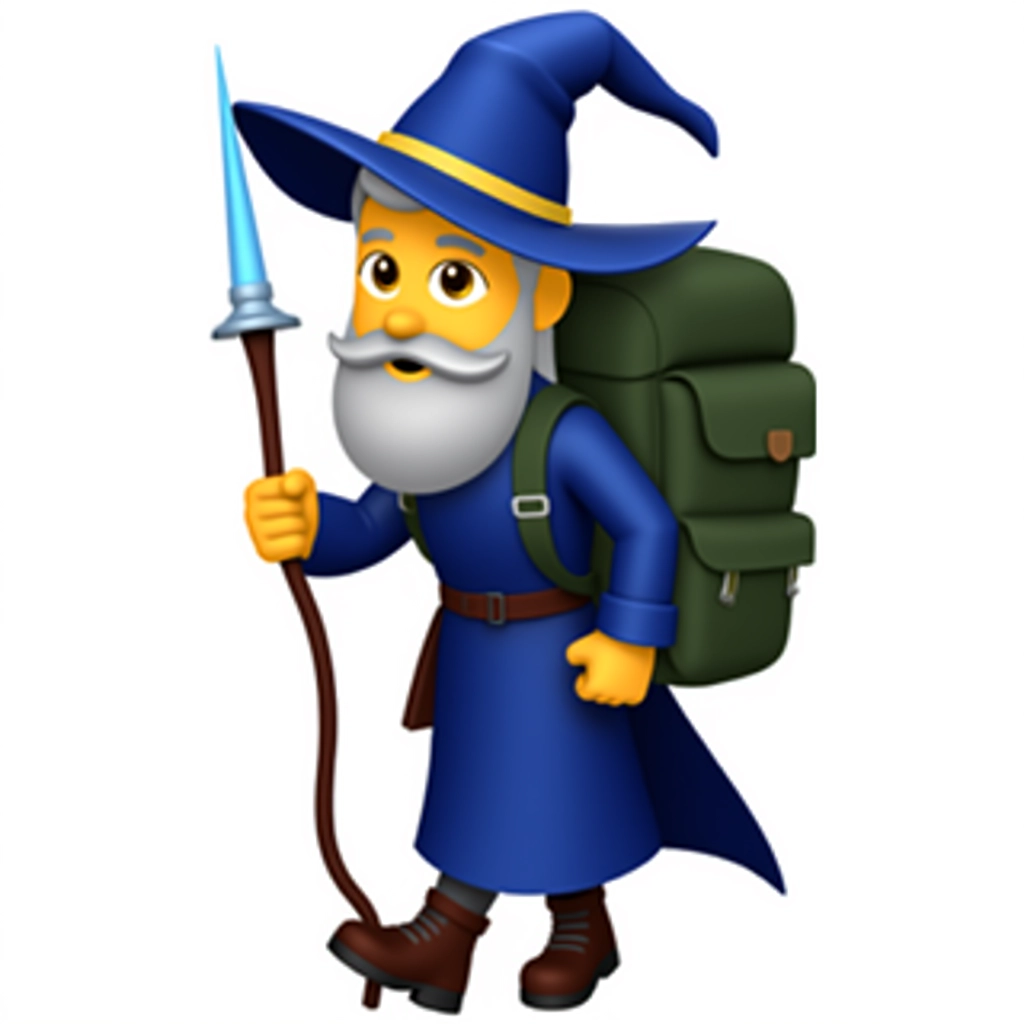
Example Output
Prompt:
"emoji of a wizard hiker wearing outdoor gear and carrying a large backpack with magical elements. robe deep blue with lighter blue highlights. long pointed hat matching blue with a gold band. backpack dark green with exaggerated straps and pockets. wooden staff brown with a glowing light blue tip. boots dark brown and rugged. beard light gray and stylized. eyes large and expressive. pose slightly leaning forward to show walking. 3D lighting. no cast shadows."
Output
Performance Metrics
13.87s
Prediction Time
14.11s
Total Time
All Input Parameters
{
  "model": "dev",
  "prompt": "emoji of a wizard hiker wearing outdoor gear and carrying a large backpack with magical elements. robe deep blue with lighter blue highlights. long pointed hat matching blue with a gold band. backpack dark green with exaggerated straps and pockets. wooden staff brown with a glowing light blue tip. boots dark brown and rugged. beard light gray and stylized. eyes large and expressive. pose slightly leaning forward to show walking. 3D lighting. no cast shadows.\n",
  "go_fast": false,
  "lora_scale": 1,
  "megapixels": "1",
  "num_outputs": 1,
  "aspect_ratio": "1:1",
  "output_format": "webp",
  "guidance_scale": 4.28,
  "output_quality": 100,
  "prompt_strength": 1,
  "extra_lora_scale": 1,
  "num_inference_steps": 50
}
Input Parameters
- mask
- Image mask for image inpainting mode. If provided, aspect_ratio, width, and height inputs are ignored.
- seed
- Random seed. Set for reproducible generation
- image
- Input image for image to image or inpainting mode. If provided, aspect_ratio, width, and height inputs are ignored.
- model
- Which model to run inference with. The dev model performs best with around 28 inference steps but the schnell model only needs 4 steps.
- width
- Width of generated image. Only works if `aspect_ratio` is set to custom. Will be rounded to nearest multiple of 16. Incompatible with fast generation
- height
- Height of generated image. Only works if `aspect_ratio` is set to custom. Will be rounded to nearest multiple of 16. Incompatible with fast generation
- prompt (required)
- Prompt for generated image. If you include the `trigger_word` used in the training process you are more likely to activate the trained object, style, or concept in the resulting image.
- go_fast
- Run faster predictions with model optimized for speed (currently fp8 quantized); disable to run in original bf16
- extra_lora
- Load LoRA weights. Supports Replicate models in the format <owner>/<username> or <owner>/<username>/<version>, HuggingFace URLs in the format huggingface.co/<owner>/<model-name>, CivitAI URLs in the format civitai.com/models/<id>[/<model-name>], or arbitrary .safetensors URLs from the Internet. For example, 'fofr/flux-pixar-cars'
- lora_scale
- Determines how strongly the main LoRA should be applied. Sane results between 0 and 1 for base inference. For go_fast we apply a 1.5x multiplier to this value; we've generally seen good performance when scaling the base value by that amount. You may still need to experiment to find the best value for your particular lora.
- megapixels
- Approximate number of megapixels for generated image
- num_outputs
- Number of outputs to generate
- aspect_ratio
- Aspect ratio for the generated image. If custom is selected, uses height and width below & will run in bf16 mode
- output_format
- Format of the output images
- guidance_scale
- Guidance scale for the diffusion process. Lower values can give more realistic images. Good values to try are 2, 2.5, 3 and 3.5
- output_quality
- Quality when saving the output images, from 0 to 100. 100 is best quality, 0 is lowest quality. Not relevant for .png outputs
- prompt_strength
- Prompt strength when using img2img. 1.0 corresponds to full destruction of information in image
- extra_lora_scale
- Determines how strongly the extra LoRA should be applied. Sane results between 0 and 1 for base inference. For go_fast we apply a 1.5x multiplier to this value; we've generally seen good performance when scaling the base value by that amount. You may still need to experiment to find the best value for your particular lora.
- replicate_weights
- Load LoRA weights. Supports Replicate models in the format <owner>/<username> or <owner>/<username>/<version>, HuggingFace URLs in the format huggingface.co/<owner>/<model-name>, CivitAI URLs in the format civitai.com/models/<id>[/<model-name>], or arbitrary .safetensors URLs from the Internet. For example, 'fofr/flux-pixar-cars'
- num_inference_steps
- Number of denoising steps. More steps can give more detailed images, but take longer.
- disable_safety_checker
- Disable safety checker for generated images.
Output Schema
Output
Example Execution Logs
Loaded LoRAs in 0.49s
Using seed: 17088
Prompt: emoji of a wizard hiker wearing outdoor gear and carrying a large backpack with magical elements. robe deep blue with lighter blue highlights. long pointed hat matching blue with a gold band. backpack dark green with exaggerated straps and pockets. wooden staff brown with a glowing light blue tip. boots dark brown and rugged. beard light gray and stylized. eyes large and expressive. pose slightly leaning forward to show walking. 3D lighting. no cast shadows.
[!] txt2img mode
  0%|          | 0/50 [00:00<?, ?it/s]
  2%|▏         | 1/50 [00:00<00:12,  3.81it/s]
  4%|▍         | 2/50 [00:00<00:11,  4.31it/s]
  6%|▌         | 3/50 [00:00<00:11,  4.07it/s]
  8%|▊         | 4/50 [00:00<00:11,  3.96it/s]
 10%|█         | 5/50 [00:01<00:11,  3.90it/s]
 12%|█▏        | 6/50 [00:01<00:11,  3.87it/s]
 14%|█▍        | 7/50 [00:01<00:11,  3.85it/s]
 16%|█▌        | 8/50 [00:02<00:10,  3.83it/s]
 18%|█▊        | 9/50 [00:02<00:10,  3.82it/s]
 20%|██        | 10/50 [00:02<00:10,  3.82it/s]
 22%|██▏       | 11/50 [00:02<00:10,  3.81it/s]
 24%|██▍       | 12/50 [00:03<00:09,  3.81it/s]
 26%|██▌       | 13/50 [00:03<00:09,  3.81it/s]
 28%|██▊       | 14/50 [00:03<00:09,  3.80it/s]
 30%|███       | 15/50 [00:03<00:09,  3.80it/s]
 32%|███▏      | 16/50 [00:04<00:08,  3.80it/s]
 34%|███▍      | 17/50 [00:04<00:08,  3.80it/s]
 36%|███▌      | 18/50 [00:04<00:08,  3.80it/s]
 38%|███▊      | 19/50 [00:04<00:08,  3.80it/s]
 40%|████      | 20/50 [00:05<00:07,  3.80it/s]
 42%|████▏     | 21/50 [00:05<00:07,  3.80it/s]
 44%|████▍     | 22/50 [00:05<00:07,  3.80it/s]
 46%|████▌     | 23/50 [00:05<00:07,  3.80it/s]
 48%|████▊     | 24/50 [00:06<00:06,  3.80it/s]
 50%|█████     | 25/50 [00:06<00:06,  3.80it/s]
 52%|█████▏    | 26/50 [00:06<00:06,  3.80it/s]
 54%|█████▍    | 27/50 [00:07<00:06,  3.80it/s]
 56%|█████▌    | 28/50 [00:07<00:05,  3.80it/s]
 58%|█████▊    | 29/50 [00:07<00:05,  3.80it/s]
 60%|██████    | 30/50 [00:07<00:05,  3.80it/s]
 62%|██████▏   | 31/50 [00:08<00:05,  3.79it/s]
 64%|██████▍   | 32/50 [00:08<00:04,  3.79it/s]
 66%|██████▌   | 33/50 [00:08<00:04,  3.79it/s]
 68%|██████▊   | 34/50 [00:08<00:04,  3.79it/s]
 70%|███████   | 35/50 [00:09<00:03,  3.80it/s]
 72%|███████▏  | 36/50 [00:09<00:03,  3.79it/s]
 74%|███████▍  | 37/50 [00:09<00:03,  3.79it/s]
 76%|███████▌  | 38/50 [00:09<00:03,  3.79it/s]
 78%|███████▊  | 39/50 [00:10<00:02,  3.79it/s]
 80%|████████  | 40/50 [00:10<00:02,  3.80it/s]
 82%|████████▏ | 41/50 [00:10<00:02,  3.79it/s]
 84%|████████▍ | 42/50 [00:11<00:02,  3.79it/s]
 86%|████████▌ | 43/50 [00:11<00:01,  3.79it/s]
 88%|████████▊ | 44/50 [00:11<00:01,  3.79it/s]
 90%|█████████ | 45/50 [00:11<00:01,  3.79it/s]
 92%|█████████▏| 46/50 [00:12<00:01,  3.79it/s]
 94%|█████████▍| 47/50 [00:12<00:00,  3.79it/s]
 96%|█████████▌| 48/50 [00:12<00:00,  3.79it/s]
 98%|█████████▊| 49/50 [00:12<00:00,  3.79it/s]
100%|██████████| 50/50 [00:13<00:00,  3.79it/s]
100%|██████████| 50/50 [00:13<00:00,  3.81it/s]
Total safe images: 1 out of 1
Version Details
- Version ID
b9d8491363c344c8a34a5085c445e224e9800b64dccfe9ab59b7521b7f50e8f2- Version Created
- April 3, 2026