blkoutuk/blkout 🖼️🔢❓📝✓ → 🖼️
Performance
6.7sTypical run time
17Total runs
About
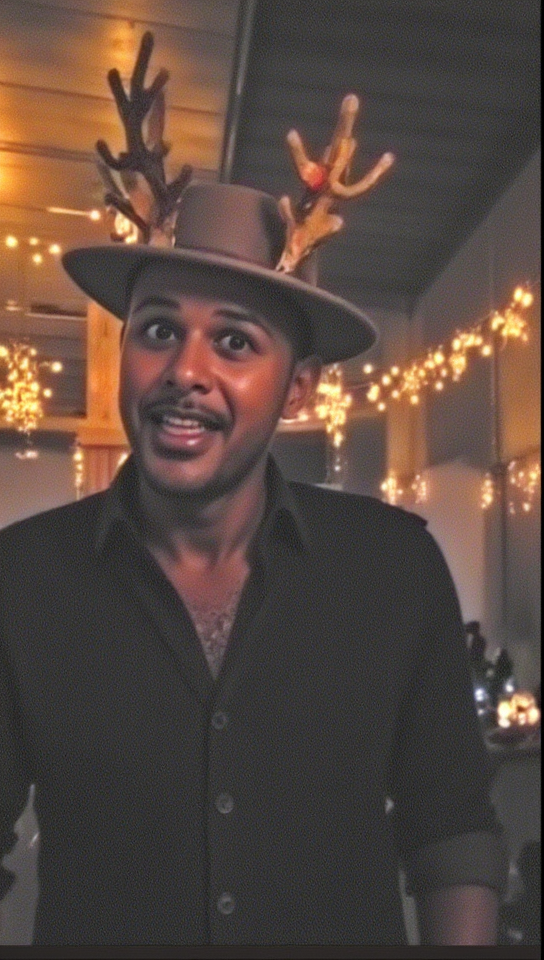
Example Output
Prompt:
"an image of MRK as a clay human reindeer with a red nose fit to pull Santa's sleigh"
Output

Performance Metrics
6.75s
Prediction Time
7.12s
Total Time
All Input Parameters
{
  "image": "https://replicate.delivery/pbxt/M4ugvBRUab0QuGKEfgbh0eDUujrVOivTmDyuV7ZopQGG1Qug/Screenshot%202024-12-03%20041207.png",
  "model": "dev",
  "prompt": "an image of MRK as a clay human reindeer with a red nose fit to pull Santa's sleigh",
  "go_fast": false,
  "lora_scale": 1,
  "megapixels": "1",
  "num_outputs": 2,
  "aspect_ratio": "9:16",
  "output_format": "png",
  "guidance_scale": 3,
  "output_quality": 80,
  "prompt_strength": 0.65,
  "extra_lora_scale": 1,
  "num_inference_steps": 28
}
Input Parameters
- mask
- Image mask for image inpainting mode. If provided, aspect_ratio, width, and height inputs are ignored.
- seed
- Random seed. Set for reproducible generation
- image
- Input image for image to image or inpainting mode. If provided, aspect_ratio, width, and height inputs are ignored.
- model
- Which model to run inference with. The dev model performs best with around 28 inference steps but the schnell model only needs 4 steps.
- width
- Width of generated image. Only works if `aspect_ratio` is set to custom. Will be rounded to nearest multiple of 16. Incompatible with fast generation
- height
- Height of generated image. Only works if `aspect_ratio` is set to custom. Will be rounded to nearest multiple of 16. Incompatible with fast generation
- prompt (required)
- Prompt for generated image. If you include the `trigger_word` used in the training process you are more likely to activate the trained object, style, or concept in the resulting image.
- go_fast
- Run faster predictions with model optimized for speed (currently fp8 quantized); disable to run in original bf16
- extra_lora
- Load LoRA weights. Supports Replicate models in the format <owner>/<username> or <owner>/<username>/<version>, HuggingFace URLs in the format huggingface.co/<owner>/<model-name>, CivitAI URLs in the format civitai.com/models/<id>[/<model-name>], or arbitrary .safetensors URLs from the Internet. For example, 'fofr/flux-pixar-cars'
- lora_scale
- Determines how strongly the main LoRA should be applied. Sane results between 0 and 1 for base inference. For go_fast we apply a 1.5x multiplier to this value; we've generally seen good performance when scaling the base value by that amount. You may still need to experiment to find the best value for your particular lora.
- megapixels
- Approximate number of megapixels for generated image
- num_outputs
- Number of outputs to generate
- aspect_ratio
- Aspect ratio for the generated image. If custom is selected, uses height and width below & will run in bf16 mode
- output_format
- Format of the output images
- guidance_scale
- Guidance scale for the diffusion process. Lower values can give more realistic images. Good values to try are 2, 2.5, 3 and 3.5
- output_quality
- Quality when saving the output images, from 0 to 100. 100 is best quality, 0 is lowest quality. Not relevant for .png outputs
- prompt_strength
- Prompt strength when using img2img. 1.0 corresponds to full destruction of information in image
- extra_lora_scale
- Determines how strongly the extra LoRA should be applied. Sane results between 0 and 1 for base inference. For go_fast we apply a 1.5x multiplier to this value; we've generally seen good performance when scaling the base value by that amount. You may still need to experiment to find the best value for your particular lora.
- replicate_weights
- Load LoRA weights. Supports Replicate models in the format <owner>/<username> or <owner>/<username>/<version>, HuggingFace URLs in the format huggingface.co/<owner>/<model-name>, CivitAI URLs in the format civitai.com/models/<id>[/<model-name>], or arbitrary .safetensors URLs from the Internet. For example, 'fofr/flux-pixar-cars'
- num_inference_steps
- Number of denoising steps. More steps can give more detailed images, but take longer.
- disable_safety_checker
- Disable safety checker for generated images.
Output Schema
Output
Example Execution Logs
2024-12-03 06:36:09.861 | DEBUG    | fp8.lora_loading:apply_lora_to_model:569 - Extracting keys
2024-12-03 06:36:09.861 | DEBUG    | fp8.lora_loading:apply_lora_to_model:576 - Keys extracted
Applying LoRA:   0%|          | 0/304 [00:00<?, ?it/s]
Applying LoRA:  91%|█████████▏| 278/304 [00:00<00:00, 2777.12it/s]
Applying LoRA: 100%|██████████| 304/304 [00:00<00:00, 2693.62it/s]
2024-12-03 06:36:09.974 | SUCCESS  | fp8.lora_loading:unload_loras:559 - LoRAs unloaded in 0.11s
free=29037779984384
Downloading weights
2024-12-03T06:36:09Z | INFO  | [ Initiating ] chunk_size=150M dest=/tmp/tmp4a_e293t/weights url=https://replicate.delivery/xezq/RT4Ko9dnPSqPGVIhYRowg6h5kfW5xUUMcxtiVhDGDGg8Ei7JA/trained_model.tar
2024-12-03T06:36:10Z | INFO  | [ Complete ] dest=/tmp/tmp4a_e293t/weights size="172 MB" total_elapsed=0.872s url=https://replicate.delivery/xezq/RT4Ko9dnPSqPGVIhYRowg6h5kfW5xUUMcxtiVhDGDGg8Ei7JA/trained_model.tar
Downloaded weights in 0.90s
2024-12-03 06:36:10.873 | INFO     | fp8.lora_loading:convert_lora_weights:493 - Loading LoRA weights for /src/weights-cache/7f4d1709cbdc6e37
2024-12-03 06:36:10.945 | INFO     | fp8.lora_loading:convert_lora_weights:514 - LoRA weights loaded
2024-12-03 06:36:10.946 | DEBUG    | fp8.lora_loading:apply_lora_to_model:569 - Extracting keys
2024-12-03 06:36:10.946 | DEBUG    | fp8.lora_loading:apply_lora_to_model:576 - Keys extracted
Applying LoRA:   0%|          | 0/304 [00:00<?, ?it/s]
Applying LoRA:  92%|█████████▏| 279/304 [00:00<00:00, 2784.74it/s]
Applying LoRA: 100%|██████████| 304/304 [00:00<00:00, 2699.27it/s]
2024-12-03 06:36:11.059 | SUCCESS  | fp8.lora_loading:load_lora:534 - LoRA applied in 0.19s
Using seed: 62558
Image detected - settting to img2img mode
Input image size: 537x957
Input image size set to: 544x960
0it [00:00, ?it/s]
2it [00:00, 12.03it/s]
4it [00:00, 10.43it/s]
6it [00:00, 10.00it/s]
8it [00:00,  9.81it/s]
9it [00:00,  9.75it/s]
10it [00:01,  9.70it/s]
11it [00:01,  9.66it/s]
12it [00:01,  9.62it/s]
13it [00:01,  9.59it/s]
14it [00:01,  9.57it/s]
15it [00:01,  9.56it/s]
16it [00:01,  9.55it/s]
17it [00:01,  9.54it/s]
18it [00:01,  9.54it/s]
19it [00:01,  9.53it/s]
19it [00:01,  9.74it/s]
0it [00:00, ?it/s]
1it [00:00,  9.67it/s]
2it [00:00,  9.59it/s]
3it [00:00,  9.57it/s]
4it [00:00,  9.57it/s]
5it [00:00,  9.55it/s]
6it [00:00,  9.54it/s]
7it [00:00,  9.54it/s]
8it [00:00,  9.54it/s]
9it [00:00,  9.53it/s]
10it [00:01,  9.53it/s]
11it [00:01,  9.53it/s]
12it [00:01,  9.52it/s]
13it [00:01,  9.51it/s]
14it [00:01,  9.52it/s]
15it [00:01,  9.52it/s]
16it [00:01,  9.53it/s]
17it [00:01,  9.53it/s]
18it [00:01,  9.53it/s]
19it [00:01,  9.53it/s]
19it [00:01,  9.54it/s]
Total safe images: 2 out of 2
Version Details
- Version ID
827ea35e1fd1ed89a35531ea4b306e66ef537a282fb9f5ec218d6773019e0d09- Version Created
- December 3, 2024