fofr/illusions 🔢🖼️📝❓ → 🖼️
Performance
2.6sTypical run time
62.4KTotal runs
About
Create illusions with img2img and masking support
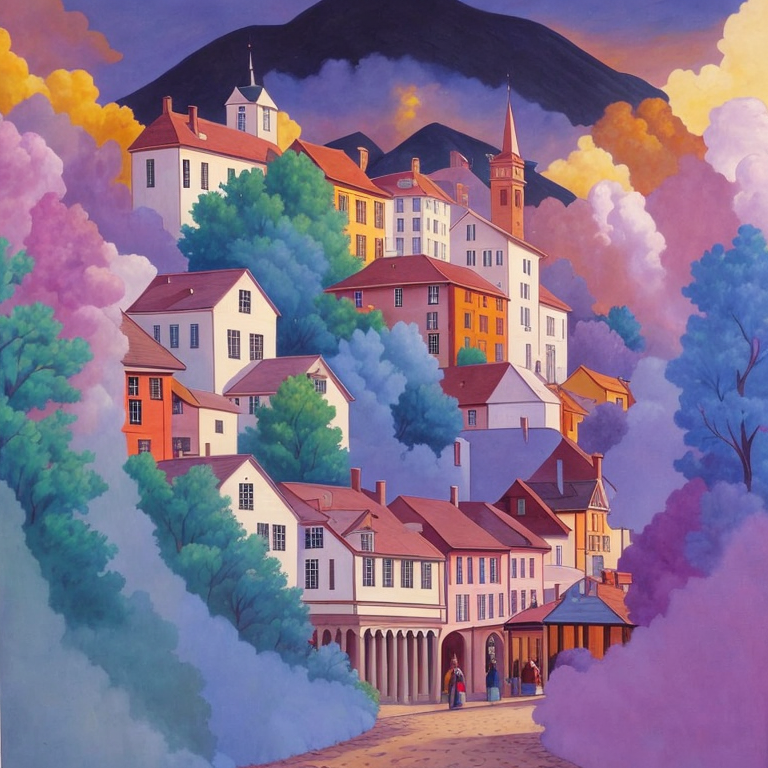
Example Output
Prompt:
"a painting of a 19th century town"
Output
Performance Metrics
2.56s
Prediction Time
2.57s
Total Time
All Input Parameters
{
  "seed": -1,
  "image": "https://replicate.delivery/pbxt/JouANiZNiW2mwouIgIk1VySvjL9MBmaPD6Ib8HyfW81CJzRR/out-0-44.png",
  "width": 768,
  "height": 768,
  "prompt": "a painting of a 19th century town",
  "num_outputs": 1,
  "control_image": "https://replicate.delivery/pbxt/JouAO2zaHgb66YVChJagSYz0LcGqv3QgG4BS71mioFbBHWTZ/spiral_black_transparent-2513050263.jpg",
  "controlnet_end": 1,
  "guidance_scale": 7.5,
  "negative_prompt": "ugly, disfigured, low quality, blurry, nsfw",
  "prompt_strength": 0.75,
  "sizing_strategy": "width/height",
  "controlnet_start": 0,
  "num_inference_steps": 40,
  "controlnet_conditioning_scale": 0.75
}
Input Parameters
- seed
- image
- Optional img2img
- width
- height
- prompt
- mask_image
- Optional mask for inpainting
- num_outputs
- Number of outputs
- control_image
- Control image
- controlnet_end
- When controlnet conditioning ends
- guidance_scale
- Scale for classifier-free guidance
- negative_prompt
- The negative prompt to guide image generation.
- prompt_strength
- Prompt strength when using img2img / inpaint. 1.0 corresponds to full destruction of information in image
- sizing_strategy
- Decide how to resize images – use width/height, resize based on input image or control image
- controlnet_start
- When controlnet conditioning starts
- num_inference_steps
- Number of diffusion steps
- controlnet_conditioning_scale
- How strong the controlnet conditioning is
Output Schema
Output
Example Execution Logs
Using seed: 3311311052
img2img mode
Using given dimensions
  0%|          | 0/30 [00:00<?, ?it/s]
  3%|▎         | 1/30 [00:00<00:03,  8.15it/s]
 10%|█         | 3/30 [00:00<00:02, 12.79it/s]
 17%|█▋        | 5/30 [00:00<00:01, 14.25it/s]
 23%|██▎       | 7/30 [00:00<00:01, 14.90it/s]
 30%|███       | 9/30 [00:00<00:01, 15.31it/s]
 37%|███▋      | 11/30 [00:00<00:01, 15.55it/s]
 43%|████▎     | 13/30 [00:00<00:01, 15.67it/s]
 50%|█████     | 15/30 [00:00<00:00, 15.76it/s]
 57%|█████▋    | 17/30 [00:01<00:00, 15.83it/s]
 63%|██████▎   | 19/30 [00:01<00:00, 15.86it/s]
 70%|███████   | 21/30 [00:01<00:00, 15.88it/s]
 77%|███████▋  | 23/30 [00:01<00:00, 15.89it/s]
 83%|████████▎ | 25/30 [00:01<00:00, 15.90it/s]
 90%|█████████ | 27/30 [00:01<00:00, 15.90it/s]
 97%|█████████▋| 29/30 [00:01<00:00, 15.89it/s]
100%|██████████| 30/30 [00:01<00:00, 15.45it/s]
Version Details
- Version ID
579b32db82b24584c3c6155fe3ae12e8fce50ba28b575c23e8a1f5f3a5e99ed8- Version Created
- November 6, 2023