fofr/sd3-explorer 🔢❓📝✓ → 🖼️
Performance
8.6sTypical run time
32.5KTotal runs
About
A model for experimenting with all the SD3 settings. Non-commercial use only, unless you have a Stability AI Self Hosted License.
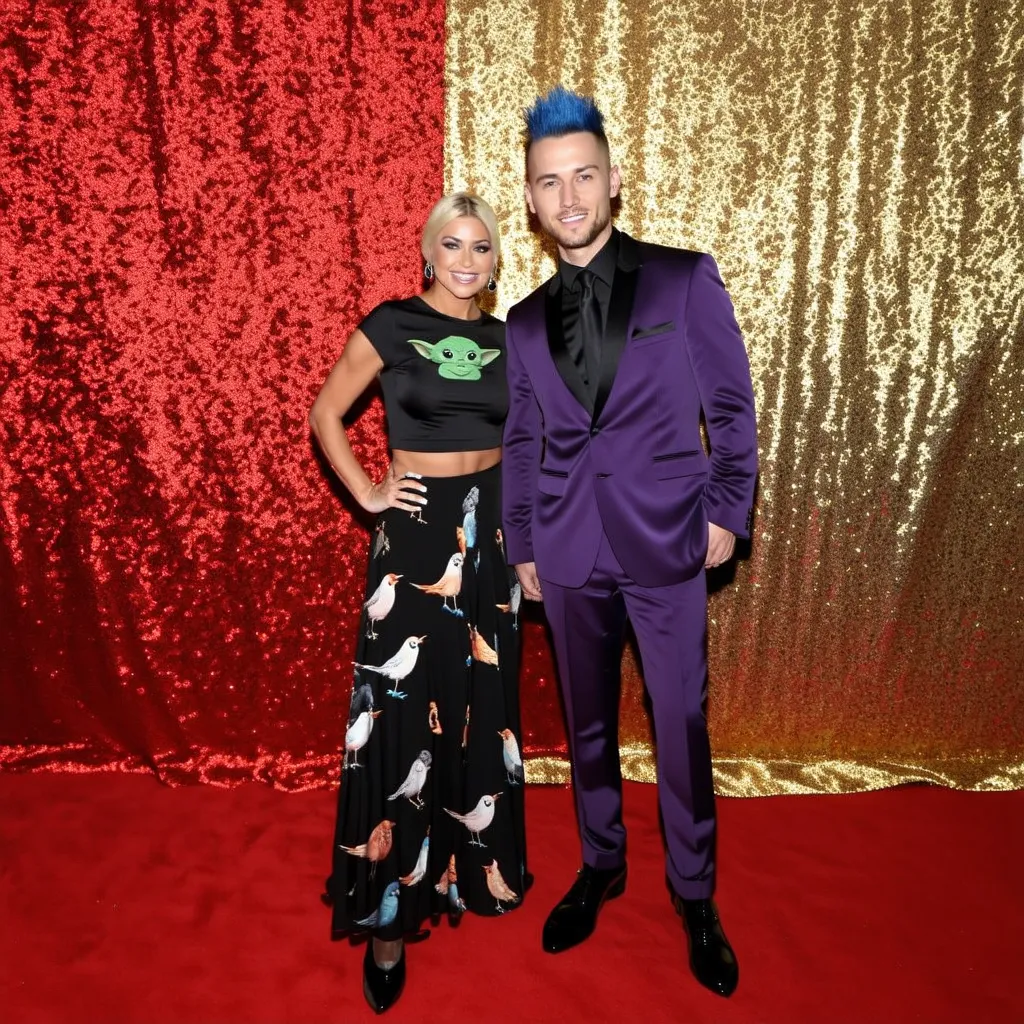
Example Output
Prompt:
"a man and woman are standing together against a backdrop, the backdrop is divided equally in half down the middle, left side is red, right side is gold, the woman is wearing a t-shirt with a yoda motif, she has a long skirt with birds on it, the man is wearing a three piece purple suit, he has spiky blue hair"
Output
Performance Metrics
8.65s
Prediction Time
8.68s
Total Time
All Input Parameters
{
  "model": "sd3_medium_incl_clips_t5xxlfp16.safetensors",
  "shift": 3,
  "steps": 28,
  "width": 1024,
  "height": 1024,
  "prompt": "a man and woman are standing together against a backdrop, the backdrop is divided equally in half down the middle, left side is red, right side is gold, the woman is wearing a t-shirt with a yoda motif, she has a long skirt with birds on it, the man is wearing a three piece purple suit, he has spiky blue hair",
  "sampler": "dpmpp_2m",
  "scheduler": "sgm_uniform",
  "output_format": "webp",
  "guidance_scale": 4.5,
  "output_quality": 80,
  "negative_prompt": "",
  "number_of_images": 1,
  "triple_prompt_t5": "",
  "use_triple_prompt": false,
  "triple_prompt_clip_g": "",
  "triple_prompt_clip_l": "",
  "negative_conditioning_end": 0,
  "triple_prompt_empty_padding": true
}
Input Parameters
- seed
- Set a seed for reproducibility. Random by default.
- model
- Pick whether to use T5-XXL in fp16, fp8 or not at all. We recommend fp16 for this model as it has the best image quality. When running locally we recommend fp8 for lower memory usage. We've included all versions here for exploration.
- shift
- The timestep scheduling shift; shift values higher than 1.0 are better at managing noise in higher resolutions. Try values 6.0 and 2.0 to experiment with effects.
- steps
- The number of steps to run the model for (more steps = better image but slower generation. Best results for this model are around 26 to 36 steps.)
- width
- The width of the image (best output at ~1 megapixel. Resolution must be divisible by 64)
- height
- The height of the image (best output at ~1 megapixel. Resolution must be divisible by 64)
- prompt
- This prompt is ignored when using the triple prompt mode. See below.
- sampler
- The sampler to use (used to manage noise)
- scheduler
- The scheduler to use (used to manage noise; do not use karras)
- output_format
- Format of the output images
- guidance_scale
- The guidance scale tells the model how similar the output should be to the prompt. (Recommend between 3.5 and 4.5; if images look 'burnt,' lower the value.)
- output_quality
- Quality of the output images, from 0 to 100. 100 is best quality, 0 is lowest quality.
- negative_prompt
- Negative prompts do not really work in SD3. This will simply cause your output image to vary in unpredictable ways.
- number_of_images
- The number of images to generate
- triple_prompt_t5
- The prompt that will be passed to just the T5-XXL model.
- use_triple_prompt
- triple_prompt_clip_g
- The prompt that will be passed to just the CLIP-G model.
- triple_prompt_clip_l
- The prompt that will be passed to just the CLIP-L model.
- negative_conditioning_end
- When the negative conditioning should stop being applied. By default it is disabled. If you want to try a negative prompt, start with a value of 0.1
- triple_prompt_empty_padding
- Whether to add padding for empty prompts. Useful if you only want to pass a prompt to one or two of the three text encoders. Has no effect when all prompts are filled. Disable this for interesting effects.
Output Schema
Output
Example Execution Logs
Random seed set to: 2483966773
Running workflow
got prompt
Executing node 6, title: CLIP Text Encode (Prompt), class type: CLIPTextEncode
Executing node 271, title: KSampler, class type: KSampler
  0%|          | 0/28 [00:00<?, ?it/s]
  4%|▎         | 1/28 [00:00<00:04,  5.89it/s]
  7%|▋         | 2/28 [00:00<00:06,  3.93it/s]
 11%|█         | 3/28 [00:00<00:06,  4.09it/s]
 14%|█▍        | 4/28 [00:00<00:05,  4.15it/s]
 18%|█▊        | 5/28 [00:01<00:05,  4.18it/s]
 21%|██▏       | 6/28 [00:01<00:05,  4.22it/s]
 25%|██▌       | 7/28 [00:01<00:04,  4.24it/s]
 29%|██▊       | 8/28 [00:01<00:04,  4.25it/s]
 32%|███▏      | 9/28 [00:02<00:04,  4.25it/s]
 36%|███▌      | 10/28 [00:02<00:04,  4.26it/s]
 39%|███▉      | 11/28 [00:02<00:03,  4.26it/s]
 43%|████▎     | 12/28 [00:02<00:03,  4.26it/s]
 46%|████▋     | 13/28 [00:03<00:03,  4.26it/s]
 50%|█████     | 14/28 [00:03<00:03,  4.26it/s]
 54%|█████▎    | 15/28 [00:03<00:03,  4.26it/s]
 57%|█████▋    | 16/28 [00:03<00:02,  4.26it/s]
 61%|██████    | 17/28 [00:03<00:02,  4.26it/s]
 64%|██████▍   | 18/28 [00:04<00:02,  4.26it/s]
 68%|██████▊   | 19/28 [00:04<00:02,  4.25it/s]
 71%|███████▏  | 20/28 [00:04<00:01,  4.26it/s]
 75%|███████▌  | 21/28 [00:04<00:01,  4.26it/s]
 79%|███████▊  | 22/28 [00:05<00:01,  4.25it/s]
 82%|████████▏ | 23/28 [00:05<00:01,  4.25it/s]
 86%|████████▌ | 24/28 [00:05<00:00,  4.25it/s]
 89%|████████▉ | 25/28 [00:05<00:00,  4.25it/s]
 93%|█████████▎| 26/28 [00:06<00:00,  4.25it/s]
 96%|█████████▋| 27/28 [00:06<00:00,  4.25it/s]
100%|██████████| 28/28 [00:06<00:00,  4.24it/s]
100%|██████████| 28/28 [00:06<00:00,  4.25it/s]
Executing node 231, title: VAE Decode, class type: VAEDecode
Executing node 273, title: Save Image, class type: SaveImage
Prompt executed in 7.17 seconds
outputs:  {'273': {'images': [{'filename': 'SD3_00001_.png', 'subfolder': '', 'type': 'output'}]}}
====================================
SD3_00001_.png
Version Details
- Version ID
a9f4aebd943ad7db13de8e34debea359d5578d08f128e968f9a36c3e9b0148d4- Version Created
- June 21, 2024