mardeganheloisa-dot/heloisa 🖼️🔢❓📝✓ → 🖼️
Performance
8.4sTypical run time
11Total runs
About
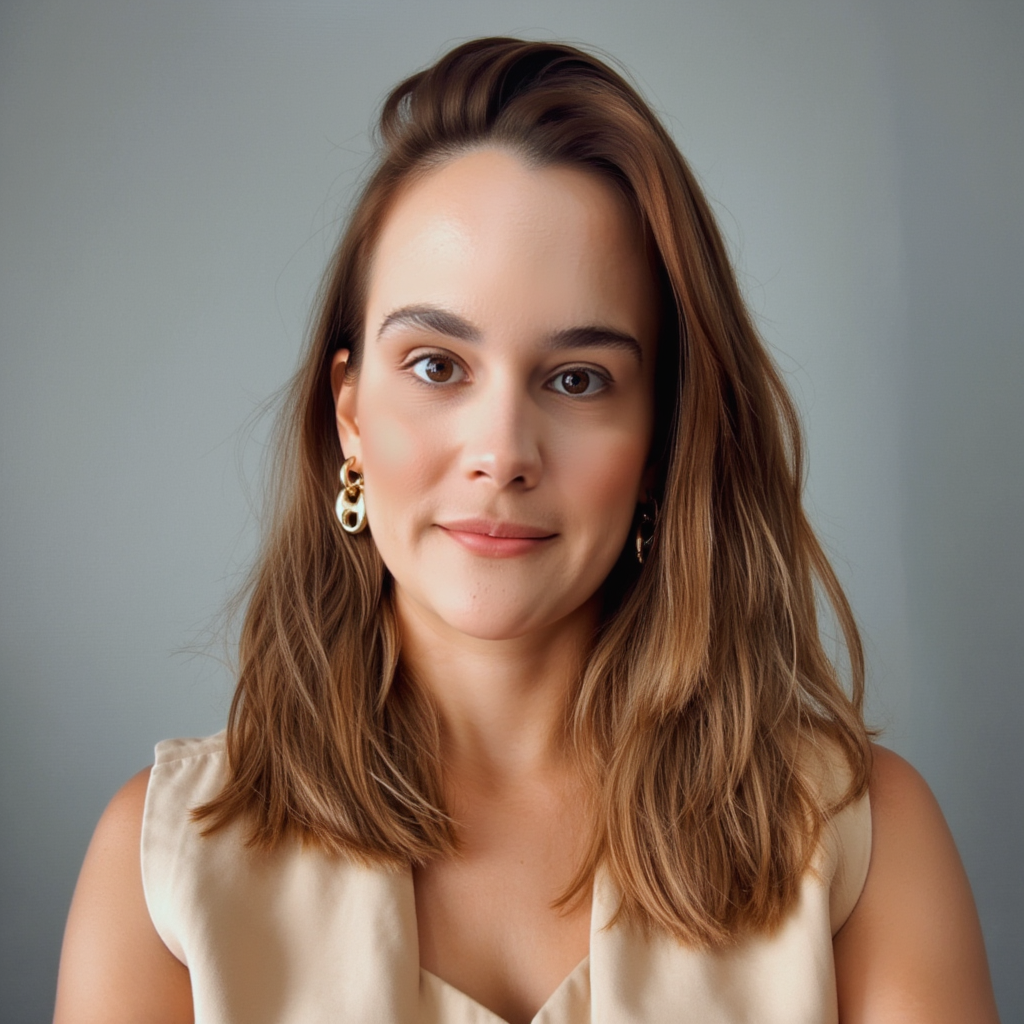
Example Output
Prompt:
"Heloisa A realistic, high-quality studio portrait of a woman with a soft, closed-mouth smile, looking directly at the camera. Medium close-up framing (head and upper torso visible), neutral gray background with subtle gradient. Soft natural lighting, slightly diffused, creating a warm and flattering look. Natural skin texture, minimal and elegant makeup, light blush, well-defined eyebrows. Medium-length wavy brown hair, loose and natural. Wearing a neutral beige blazer over a light top. Calm, confident, and approachable expression. Professional photography style, shallow depth of field, sharp focus, high resolution, timeless and refined aesthetic."
Output
Performance Metrics
8.36s
Prediction Time
8.44s
Total Time
All Input Parameters
{
  "model": "dev",
  "prompt": "Heloisa A realistic, high-quality studio portrait of a woman with a soft, closed-mouth smile, looking directly at the camera. Medium close-up framing (head and upper torso visible), neutral gray background with subtle gradient. Soft natural lighting, slightly diffused, creating a warm and flattering look. Natural skin texture, minimal and elegant makeup, light blush, well-defined eyebrows. Medium-length wavy brown hair, loose and natural. Wearing a neutral beige blazer over a light top. Calm, confident, and approachable expression. Professional photography style, shallow depth of field, sharp focus, high resolution, timeless and refined aesthetic.",
  "go_fast": false,
  "lora_scale": 1,
  "megapixels": "1",
  "num_outputs": 1,
  "aspect_ratio": "1:1",
  "output_format": "png",
  "guidance_scale": 3,
  "output_quality": 80,
  "prompt_strength": 0.8,
  "extra_lora_scale": 1,
  "num_inference_steps": 28
}
Input Parameters
- mask
- Image mask for image inpainting mode. If provided, aspect_ratio, width, and height inputs are ignored.
- seed
- Random seed. Set for reproducible generation
- image
- Input image for image to image or inpainting mode. If provided, aspect_ratio, width, and height inputs are ignored.
- model
- Which model to run inference with. The dev model performs best with around 28 inference steps but the schnell model only needs 4 steps.
- width
- Width of generated image. Only works if `aspect_ratio` is set to custom. Will be rounded to nearest multiple of 16. Incompatible with fast generation
- height
- Height of generated image. Only works if `aspect_ratio` is set to custom. Will be rounded to nearest multiple of 16. Incompatible with fast generation
- prompt (required)
- Prompt for generated image. If you include the `trigger_word` used in the training process you are more likely to activate the trained object, style, or concept in the resulting image.
- go_fast
- Run faster predictions with model optimized for speed (currently fp8 quantized); disable to run in original bf16
- extra_lora
- Load LoRA weights. Supports Replicate models in the format <owner>/<username> or <owner>/<username>/<version>, HuggingFace URLs in the format huggingface.co/<owner>/<model-name>, CivitAI URLs in the format civitai.com/models/<id>[/<model-name>], or arbitrary .safetensors URLs from the Internet. For example, 'fofr/flux-pixar-cars'
- lora_scale
- Determines how strongly the main LoRA should be applied. Sane results between 0 and 1 for base inference. For go_fast we apply a 1.5x multiplier to this value; we've generally seen good performance when scaling the base value by that amount. You may still need to experiment to find the best value for your particular lora.
- megapixels
- Approximate number of megapixels for generated image
- num_outputs
- Number of outputs to generate
- aspect_ratio
- Aspect ratio for the generated image. If custom is selected, uses height and width below & will run in bf16 mode
- output_format
- Format of the output images
- guidance_scale
- Guidance scale for the diffusion process. Lower values can give more realistic images. Good values to try are 2, 2.5, 3 and 3.5
- output_quality
- Quality when saving the output images, from 0 to 100. 100 is best quality, 0 is lowest quality. Not relevant for .png outputs
- prompt_strength
- Prompt strength when using img2img. 1.0 corresponds to full destruction of information in image
- extra_lora_scale
- Determines how strongly the extra LoRA should be applied. Sane results between 0 and 1 for base inference. For go_fast we apply a 1.5x multiplier to this value; we've generally seen good performance when scaling the base value by that amount. You may still need to experiment to find the best value for your particular lora.
- replicate_weights
- Load LoRA weights. Supports Replicate models in the format <owner>/<username> or <owner>/<username>/<version>, HuggingFace URLs in the format huggingface.co/<owner>/<model-name>, CivitAI URLs in the format civitai.com/models/<id>[/<model-name>], or arbitrary .safetensors URLs from the Internet. For example, 'fofr/flux-pixar-cars'
- num_inference_steps
- Number of denoising steps. More steps can give more detailed images, but take longer.
- disable_safety_checker
- Disable safety checker for generated images.
Output Schema
Output
Example Execution Logs
Loaded LoRAs in 0.55s
Using seed: 8495
Prompt: Heloisa A realistic, high-quality studio portrait of a woman with a soft, closed-mouth smile, looking directly at the camera. Medium close-up framing (head and upper torso visible), neutral gray background with subtle gradient. Soft natural lighting, slightly diffused, creating a warm and flattering look. Natural skin texture, minimal and elegant makeup, light blush, well-defined eyebrows. Medium-length wavy brown hair, loose and natural. Wearing a neutral beige blazer over a light top. Calm, confident, and approachable expression. Professional photography style, shallow depth of field, sharp focus, high resolution, timeless and refined aesthetic.
[!] txt2img mode
  0%|          | 0/28 [00:00<?, ?it/s]
  4%|▎         | 1/28 [00:00<00:07,  3.82it/s]
  7%|▋         | 2/28 [00:00<00:06,  4.33it/s]
 11%|█         | 3/28 [00:00<00:06,  4.09it/s]
 14%|█▍        | 4/28 [00:00<00:06,  3.98it/s]
 18%|█▊        | 5/28 [00:01<00:05,  3.93it/s]
 21%|██▏       | 6/28 [00:01<00:05,  3.90it/s]
 25%|██▌       | 7/28 [00:01<00:05,  3.88it/s]
 29%|██▊       | 8/28 [00:02<00:05,  3.86it/s]
 32%|███▏      | 9/28 [00:02<00:04,  3.85it/s]
 36%|███▌      | 10/28 [00:02<00:04,  3.85it/s]
 39%|███▉      | 11/28 [00:02<00:04,  3.84it/s]
 43%|████▎     | 12/28 [00:03<00:04,  3.84it/s]
 46%|████▋     | 13/28 [00:03<00:03,  3.84it/s]
 50%|█████     | 14/28 [00:03<00:03,  3.84it/s]
 54%|█████▎    | 15/28 [00:03<00:03,  3.84it/s]
 57%|█████▋    | 16/28 [00:04<00:03,  3.84it/s]
 61%|██████    | 17/28 [00:04<00:02,  3.83it/s]
 64%|██████▍   | 18/28 [00:04<00:02,  3.83it/s]
 68%|██████▊   | 19/28 [00:04<00:02,  3.83it/s]
 71%|███████▏  | 20/28 [00:05<00:02,  3.83it/s]
 75%|███████▌  | 21/28 [00:05<00:01,  3.82it/s]
 79%|███████▊  | 22/28 [00:05<00:01,  3.82it/s]
 82%|████████▏ | 23/28 [00:05<00:01,  3.82it/s]
 86%|████████▌ | 24/28 [00:06<00:01,  3.83it/s]
 89%|████████▉ | 25/28 [00:06<00:00,  3.83it/s]
 93%|█████████▎| 26/28 [00:06<00:00,  3.83it/s]
 96%|█████████▋| 27/28 [00:06<00:00,  3.83it/s]
100%|██████████| 28/28 [00:07<00:00,  3.83it/s]
100%|██████████| 28/28 [00:07<00:00,  3.86it/s]
Total safe images: 1 out of 1
Version Details
- Version ID
3da4a86bb6fde65f817d2d35564addea0f63858a8c548207988c098853dbc401- Version Created
- January 31, 2026